

|
|
|
The Input registry key contains a mailbox subkey (Journal1 in the example below).
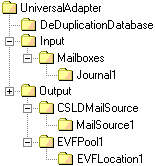
Within this mailbox subkey, configure the following registry settings to enable the UA to ingest emails from the correct Domino source:
Type: REG_SZ
Data: This setting specifies the name or IP address of the Domino server hosting the Notes journal database you want to import from.
Type: REG_SZ
Data: This mandatory setting specifies the Notes journal database you want to import from. You must supply the database name and user name. For example, Mail\srimmel.
Note: To import from more than one Notes database, each must have its own separate subkey in the Input\Mailboxes registry key.
Type: REG_SZ
Data: This must list a single output that the Universal Adapter will output e‑mails to (for example, CSLDMailSource). This entry must match the subkey name listed under the Output registry key.
| Copyright © 2011 CA. All rights reserved. | Email CA Technologies about this topic |