

|
|
|
The EV archive agent is a custom filter for an Exchange Journaling task that works with Enterprise Vault. After installing the EV archive agent, you must manually register this filter with Enterprise Vault. To do this, edit the registry on the agent host machine.
To register the EV archive agent
HKEY_LOCAL_MACHINE\SOFTWARE\KVS\Enterprise Vault
  \External Filtering\Journaling
If the \Journaling registry key does not already exist, you must create it.
Name: Set this to be an integer such as 1, 2 or 3. The number determines the filter processing order, with registry value 1 processed first. But see the note below.
Type: REG_SZ
Data: Set this to WgnEVFilter.WgnEnterpriseVaultFilter
Important! It is essential that the EV archive agent is processed before the Compliance Accelerator Journaling Connector. This means that when defining numeric registry values, the EV archive agent must have a lower number than the Journaling Connector.
For example, if the Journaling Connector is already assigned to registry value ‘1’, you must rename this value to ‘2’ and create a new value ‘1’ for the EV archive agent. To identify which numeric registry value is associated with the Journaling Connector, look for a value whose data is set to KVS.Accelerator.Plugin.Filter.
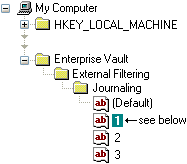
Enterprise Vault registry: Filter registry values
In this example, the filter for the EV archive agent is assigned to registry value ‘1’. Its data is set to:
WgnEVFilter.WgnEnterpriseVaultFilter
Likewise, if Exchange Journaling tasks use multiple filters, you must decide in which order the EV archive agent is processed—but see the Important above.
But first, you must configure the EV archive agent, the hub, and the policy engines.
| Copyright © 2011 CA. All rights reserved. | Email CA Technologies about this topic |