

|
|
|
CA DLP can integrate with the Symantec Enterprise Vault archive solution. From the Symantec Web site:
"Enterprise Vault software provides a flexible archiving framework to enable the discovery of content held within email, file system and collaborative environments, while helping to reduce storage costs and simplifying management."
Integration is provided through a CA DLP custom filter for Enterprise Vault, wgnsev.dll. In This section, the term ‘EV archive agent’ refers to this custom filter.
When integration is enabled, Enterprise Vault notifies the EV archive agent when it extracts an email from a Microsoft Exchange journal mailbox. The EV archive agent passes a copy of the e‑mail to the policy engine hub.
The hub allocates the email to a policy engine, which then applies the appropriate smart tags to the email (typically an email category and a retention date and passes this data back to the EV archive agent and then to Enterprise Vault. Finally, Enterprise Vault archives the e‑mail along with its smart tag details.
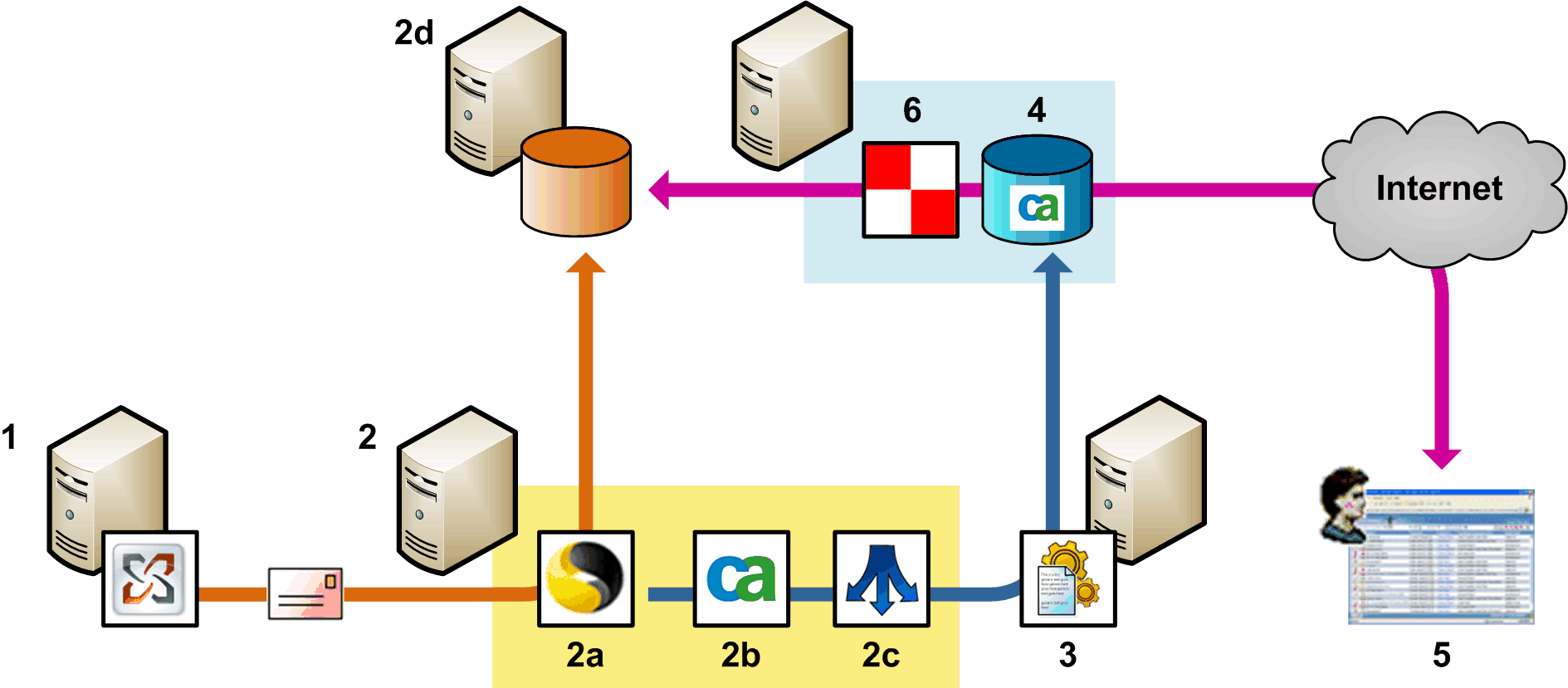
CA DLP integration with Enterprise Vault
Enterprise Vault extracts an email from the journal mailbox in Microsoft Exchange (1).
On this host server (2), the Enterprise Vault (2a) notifies the EV archive agent (2b) that an email is available for processing. The EV archive agent passes the email to the hub (2c).
The hub allocates the email to a policy engine for processing (3).
This applies triggers as necessary and applies smart tags to the email. These are saved as event metadata. Processed events are then replicated from the policy engine up to the CMS (4).
Finally, when displaying archived e‑mails in a console (5), the Remote Data Manager (6) retrieves data for emails stored in the Enterprise Vault archive (2d).
| Copyright © 2011 CA. All rights reserved. | Email CA Technologies about this topic |