

|
|
|
To configure the CFSA, you need to edit settings in the Client File System Agent folder of the machine policy on each client machine. We recommend that you edit the common client machine policy. You may also need to adjust settings in the Policy Engine folder.
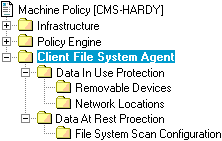
The key machine policy settings are listed below and described in the following sections:
Treat These Drives As Removable
Trusted Application List
Default Handling
Special Device List
Handling for Special Devices
Trusted Application List
Default Handling
Special Locations List
Handling of Special Locations
Included Folders; Excluded Folders
Included Files; Excluded Files
Default Policy for Data At Rest
Enable File System Scan
Start Time
Start Day
Frequency (days)
Maximum Number of Concurrent Operations
Deadlock Detection Timeout (seconds)
| Copyright © 2011 CA. All rights reserved. | Email CA Technologies about this topic |