

Transaction sampling enables CA Introscope agents to take a transaction trace occasionally without having an explicit transaction trace session running. The sampling does not apply any filtering and wakes up on a timer to take the sample. The samples are visible from the Workstation.
Important! The sampled traces are only visible from the Workstation Investigator metric tree traces tab. The traces do not show in the Transaction Trace Viewer of a transaction trace session.
Trace samples that are taken from a front-end agent automatically attempt to generate correlated cross-process back-end transaction traces. These back-end traces that correlate with front-end samples have the trace type, Normal. When running a transaction trace session, the high volume of back-end transaction trace sessions can hit the antiflood limit. The front-end samples may not have correlated traces. When the antiflood limit is hit, the worst performing (by duration) transaction traces get preferential delivery. Therefore, if a back-end transaction trace is missing during a high volume period, it is not likely to be the source of a problem.
The Cross-Enterprise APM Agent can be configured to take independent transaction samples that originated at front-end applications that a Cross-Enterprise APM tracer monitors using a communication method into CICS or IMS (the back ends). Samples generated directly from the agent do not always have correlated front-end traces because they are taken at random intervals independent of the front-end samples.
Follow these steps:
Enables or disables the transaction sampling. If this parameter is set to false, the other parameters are ignored.
Default: true
Specifies when the transaction sample is captured.
Default: 120 seconds
Limits: 1 second through 300 seconds (5 minutes)
Specifies the number of samples that are captured in a transaction sampling interval.
Default: 15
Limits: 1 through 1000
Enables or disables the transaction sampling. If this parameter is set to false, the other parameters are ignored.
Default: true
Specifies when the transaction sample is captured.
Default: 120 seconds
Limits: 1 second up to 300 seconds (5 minutes)
Specifies the number of samples that are captured in a transaction sampling interval.
Limits: 1 to 1000
Default: 15
After you start or restart the Cross-Enterprise APM Agent, the new settings are applied.
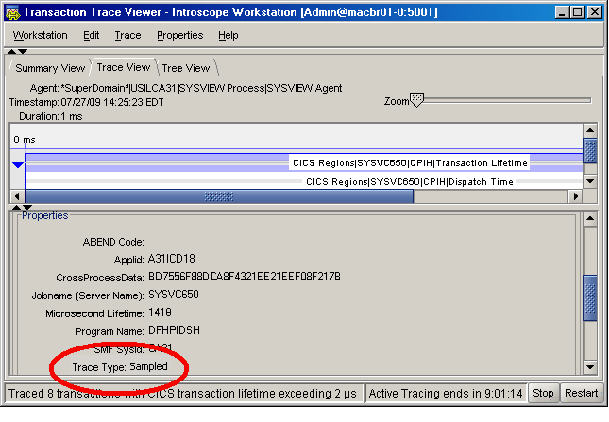
Any transaction trace types that you receive have Sampled in the Trace Type:
|
Copyright © 2013 CA.
All rights reserved.
|
|