

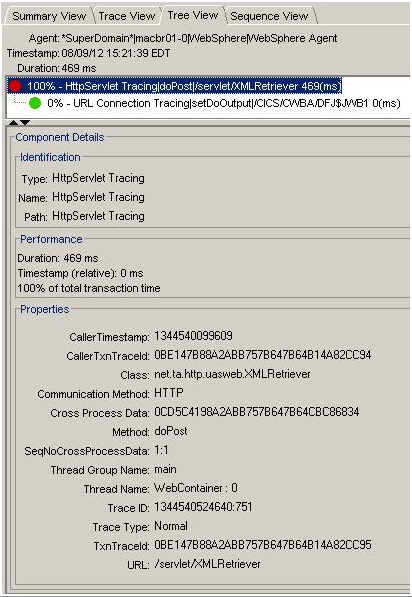
Any subclass of HTTPServlet will generate the HTTP Servlet component when one of the methods that implements methods doGet(), doPut(), doPost() or doDelete() is called. Properties that can be filtered in the Transaction Trace Session dialog box list the filter name.
Identifies the class that implemented the HTTPServlet class.
Specifies a UUID used for correlation and is applicable only to HTTP transaction tracers.
This property appears only if this component is the root component.
Format: A 32-byte UUID
Identifies the communication method that is used to invoke the transaction. This value is always set to HTTP.
Filter: CICS/IMS communication method equals
Identifies the called method that was instrumented and which caused the component to be inserted.
Values: doGet, doPut, doPost, and DoDelete
Specifies the sequence ID of the correlation UUID.
This property appears only if this component is the root component.
Specifies the trace identifier, a unique value that is generated for each trace event.
This property appears only if this component is the root component.
Specifies the transaction trace type.
This property appears only if this component is the root component.
Indicates a normal trace that is taken during a transaction trace session.
Alternately, a trace that correlates with a sample from another agent.
Indicates a sample trace that is taken because sampling is set. The sample trace appears in the Transaction Trace Viewer pane as correlated traces.
Indicates the URL of the servlet. The leading protocol specifier, computer name, and port number are not included.
Example: /HTTPTest/servlet/FrontEndClient
Filter: URL (from the drop-down list)
|
Copyright © 2014 CA.
All rights reserved.
|
|