

CA Cross-Enterprise APM is an extension to CA APM that enables mainframe application monitoring and management from a distributed platform interface. This extension allows you to do the following tasks:
This extension increases end-to-end visibility for quickly isolating transaction performance problems and allows you to leverage performance data from CA SYSVIEW, CA Insight DPM, and CA NetMaster NM for TCP/IP.
Additionally, it addresses the problems that are associated with applications that span mainframe and distributed environments as these environments have different tools, processes, and teams. Using CA Cross-Enterprise APM, you can bridge all enterprise environments.
After the installation is complete, CA Cross-Enterprise APM has an architecture that looks like this diagram. The diagram illustrates in general how each component connects to other components. On each z/OS system (Mainframe) that you want CA APM to monitor, you have CA Cross-Enterprise APM Agent, CA SYSVIEW, CA Insight DPM, and CA NetMaster NM for TCP/IP running.
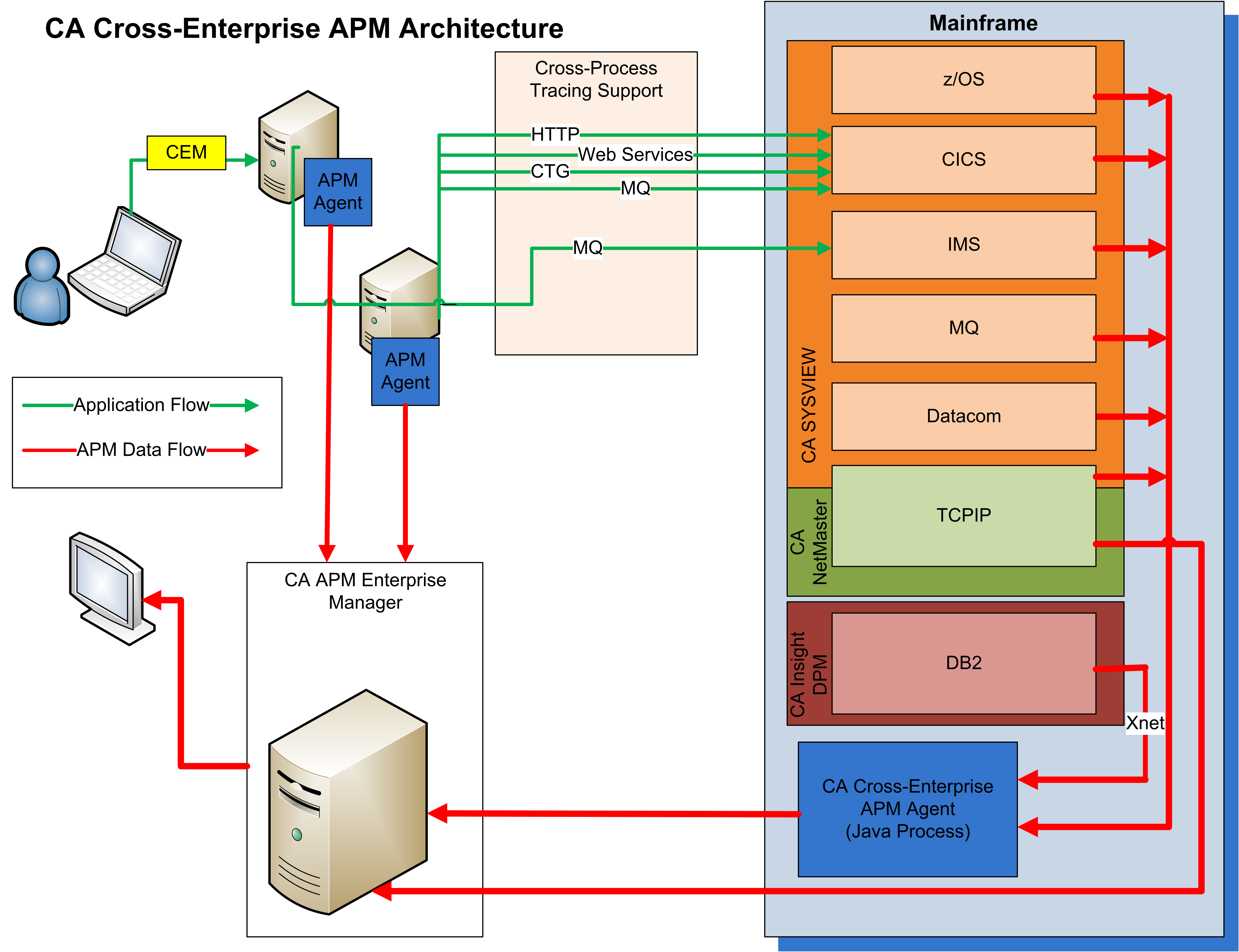
The agent is designed to allow the tracing of transactions across the multiple tiers of an application that invokes transactions on the mainframe. These components are:
On the mainframe, CA Cross-Enterprise APM Agent collects information for analysis from z/OS, CICS, IMS, WebSphere MQ, CA Datacom/DB, and DB2 products components. These collections are done using CA SYSVIEW and CA Insight DPM.
Xnet (Execution Manager Network) provides a communications subsystem that CA Database Management Solutions for DB2 for z/OS shares. Xnet executes as a started task in its own address space between CA Insight DPM and other CA Technologies products, including CA Cross-Enterprise APM and CA SYSVIEW PM. Xnet is required for CA Cross-Enterprise APM to interface with CA Insight DPM to collect DB2 information.
CA NetMaster NM for TCP/IP allows information to be collected for TCP/IP.
Note: If you only require TCP/IP network data, you do not have to install CA Cross-Enterprise APM but you must have the CA Cross-Enterprise APM license.
All Enterprise Managers (EMs) connect to the APM database to store data for business transactions and application triage maps.
Note: For more information, see Recommended Reading for the documentation that is related to CA Cross-Enterprise APM.
|
Copyright © 2014 CA.
All rights reserved.
|
|