

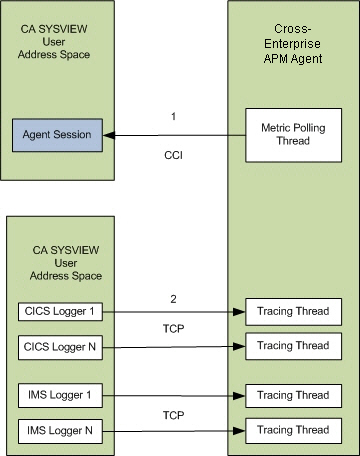
This diagram provides a high-level overview of the Cross-Enterprise APM Agent configuration steps.
Before you begin
Before you begin configuring the Cross-Enterprise APM Agent, verify that you have Set Up CAICCI for CA Cross-Enterprise APM.
Follow these steps:
SYSVIEWPATH=/usr/lpp/sysview/cnm4d70
Note: Your directory varies according to the CA SYSVIEW release. Verify that the file being referenced in STDENV resides at the path you provide here.
SYSVIEW.connection.jobname=
Note: The jobname parameter is not required because the agent discovers the CA SYSVIEW user address space running on the same system. This parameter is required only if you run multiple copies of CA SYSVIEW and multiple user address spaces.
Note: For more information about setting the Cross-Enterprise_APM_Dynamic.properties configurations, see Configure the Cross-Enterprise_APM_Dynamic.properties File.
ppz.smf.socket.port=15029
sysvhlq.CNM4BPRM(CICSLOGR)
Wily-Introscope-PortList CICSWILY

sysvhlq.CNM4BPRM(GROUPS)
DEFINE CICSWILY
       TYPE    PORTLIST
       DESC    'Wily Agent Listener Port '
       MEMBERS 15029

sysvhlq.CNM4BPRM(IMSLOGR)
Wily-Introscope-PortList IMSWILY

sysvhlq.CNM4BPRM(GROUPS)
DEFINE IMSWILY
       TYPE    PORTLIST
       DESC    'Wily Agent Listener Port '
       MEMBERS 15029
Note: For more information about setting the Introscope_Cross-Enterprise_APM.profile configurations, see Configure the Introscope_Cross-Enterprise_APM.profile File.
Note: After you configure these settings, read and accept the End User License Agreement. For more information, see Configure and accept the End User License Agreement.
|
Copyright © 2014 CA.
All rights reserved.
|
|