

|
|
|
You check out privileged accounts to perform administrative tasks on endpoints, and check in privileged accounts when you have finished working on the endpoint.
Important! A user must have an endpoint privileged access role to perform tasks on an endpoint type. Endpoint privileged access roles specify the types of endpoints on which a user can perform tasks using a privileged access account.
For example, if you assign the Windows endpoint privileged access role to a user, the user can perform endpoint tasks on Windows endpoints that use privileged accounts. If you assign the Break Glass, Privileged Account Request, or PUPM User role to a user, assign the user an endpoint privileged access role, or the user is not able to complete any tasks.
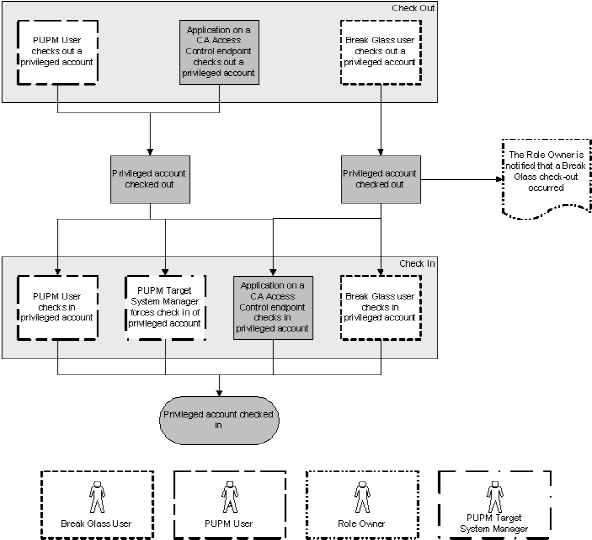
The following process describes how privileged access roles affect the check-out and check-in tasks that users perform:
The privileged account is checked out.
Note: If a user performs a break glass checkout, CA Access Control notifies the role owner. The role owner can choose to add information to this message for auditing purposes.
The privileged account is checked in.
The following diagram illustrates how privileged access roles affect the check in and check out tasks that users perform:
Example: Check Out a Privileged Account
You have the System Manager role. You assign Joe the PUPM User role and the Windows Agentless Connection endpoint privileged access role. Joe logs in to CA Access Control Enterprise Management, and sees only the tasks that let him check out and check in privileged accounts on Windows endpoints.
Example: Break Glass for a Privileged Account
You have the System Manager role. You assign Fiona the Break Glass role and the Oracle Server Connection endpoint privileged access role. Fiona needs immediate access to an Oracle endpoint. She logs in to CA Access Control Enterprise Management and sees only the tasks that let her perform a break glass check out for accounts on Oracle endpoints. Fiona performs a break glass check out for an Oracle privileged account, and CA Access Control sends a notification message to the Break Glass role owner.
Note: By default, the Break Glass role owner is the System Manager admin role.
| Copyright © 2012 CA. All rights reserved. |
|