

|
|
|
Privileged User Password Management (PUPM) is the process through which an organization secures, manages, and tracks all activities associated with the most powerful accounts within the organization. Before you can begin using privileged account passwords, you complete several steps that set up CA Access Control Enterprise Management for PUPM. Users can then start working with the privileged accounts that you define.
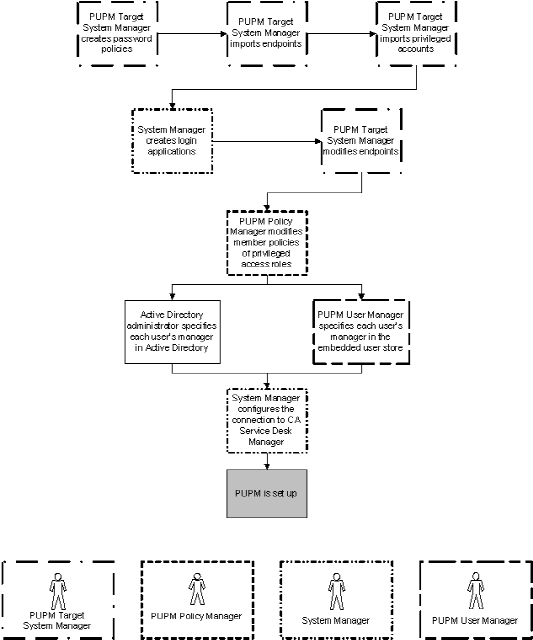
The following process explains the tasks that users in your enterprise must complete to set up privileged accounts. Users must have the specified role to complete each process step. A user with the System Manager admin role can perform every CA Access Control Enterprise Management task in this process.
Note: Before you begin this process, verify that email notification is enabled in CA Access Control Enterprise Management. If CA Access Control Enterprise Management cannot display a password to a user, it emails the password to the user instead.
To set up privileged accounts, users do the following:
Note: If you use Active Directory as your user store, we recommend that you modify each member policy to point to a corresponding Active Directory group. You can then add or remove users from a role by adding or removing them from the corresponding Active Directory group. This greatly simplifies administrative overhead.
Note: Only a manager can approve privileged account requests that the user makes. If you use Active Directory as your user store, verify that each user's manager is specified in Active Directory.
Integrating with CA Service Desk Manager lets you create multiple approval processes for privileged account requests.
The following diagram illustrates the privileged access role that performs each process step:
| Copyright © 2012 CA. All rights reserved. |
|