

|
|
|
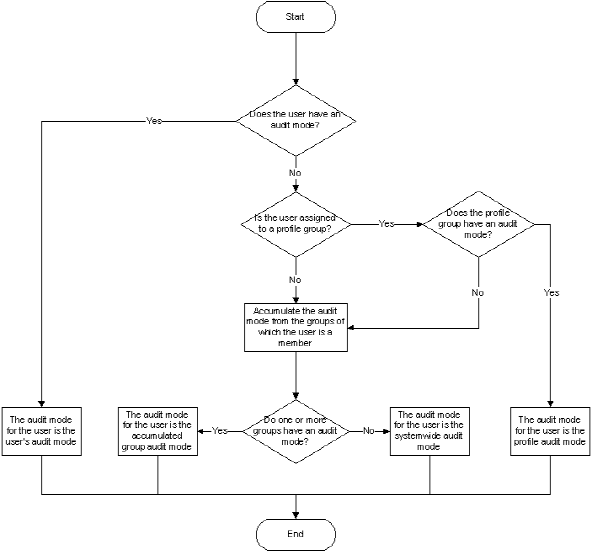
The audit mode for a user specifies which audit events CA Access Control sends to the audit log for that user. The following process describes how CA Access Control determines the audit mode for a user:
If the user's record has a value for the AUDIT property, CA Access Control uses that value as the audit mode for the user.
If the user is assigned to a profile group and the profile group's record has a value for the AUDIT property, CA Access Control uses that value as the audit mode for the user.
If the user is group member and the group's record has a value for the AUDIT property, CA Access Control uses that value as the audit mode for the user. If the user is not a member of a group, or if the group's record does not have a value for the AUDIT property, CA Access Control assigns the systemwide audit mode to the user.
Note: The user's audit mode accumulates if a user is a member of more than one group and the groups have different audit modes. The audit mode for the user is the sum of all the audit modes for the groups of which they are members.
Note: If CA Access Control uses the value of a group's AUDIT property to determine the audit mode for a user, and you change the group's audit mode while the user is logged in, the audit mode for the logged-in user also changes. The user does not have to log off for the change in group audit mode to take effect.
The following diagram shows how CA Access Control determines the audit mode for a user:
Example: Audit by Groups
User Jan is a member of Group A and Group B. Group A has an audit mode of FAIL and Group B has an audit mode of SUCCESS. Because Jan is a member of both groups, Jan has the accumulated audit mode of FAIL and SUCCESS.
| Copyright © 2012 CA. All rights reserved. |
|