

|
|
|
Before you implement CA Access Control Enterprise Management in your enterprise, you should understand which components to install, in what order, and where to install them. Observe the following guidelines when you implement an enterprise deployment of CA Access Control Enterprise Management:
Note: For more information about the required hardware and software specifications, see the CA Access Control Compatibility Matrix that is available from the CA Access Control product page on CA Support.
Use the following process to implement CA Access Control Enterprise Management:
The following diagram illustrates the implementation process for CA Access Control Enterprise Management:
Use this diagram to help you implement the Enterprise Management Server:
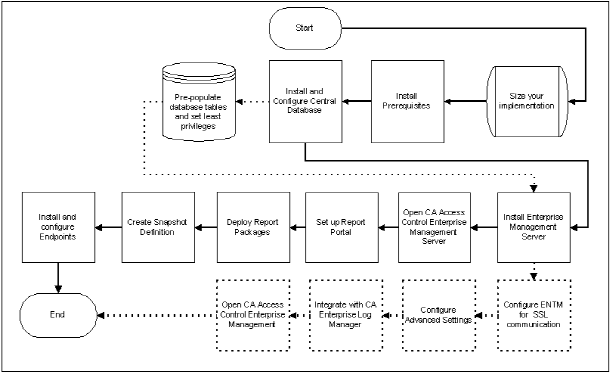
Note: The dashed lines represent optional steps.
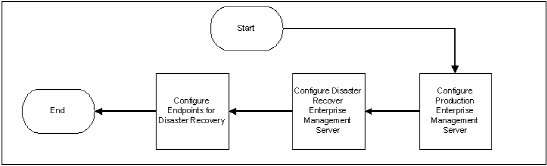
Use the following diagram to help you implement CA Access Control for disaster recovery:
| Copyright © 2012 CA. All rights reserved. |
|