

Console Manager continually appends the console data and event information to the appropriate log files for the serviced systems. Also, Console Manager events are appended to the Console Manager log files. Console Manager will always log console data from your serviced systems, and Console Manager events, even if you do not set up ENS to monitor events on those systems.
If you are managing many systems, the log and archive files may take up large amounts of disk space, depending on the amount of data received and the number of events being generated by those systems.
You can decrease the size of the log files by archiving on a regular basis (see the section Background Information on Archiving Log Files earlier in this chapter). If you do not want to keep the archive files, you can delete them either manually after an archive operation, or as part of the archive operation.
We recommend that you use an archive strategy for Console Manager. For example, archive once a day, or once a week, depending on the amount of data and number of events being logged.
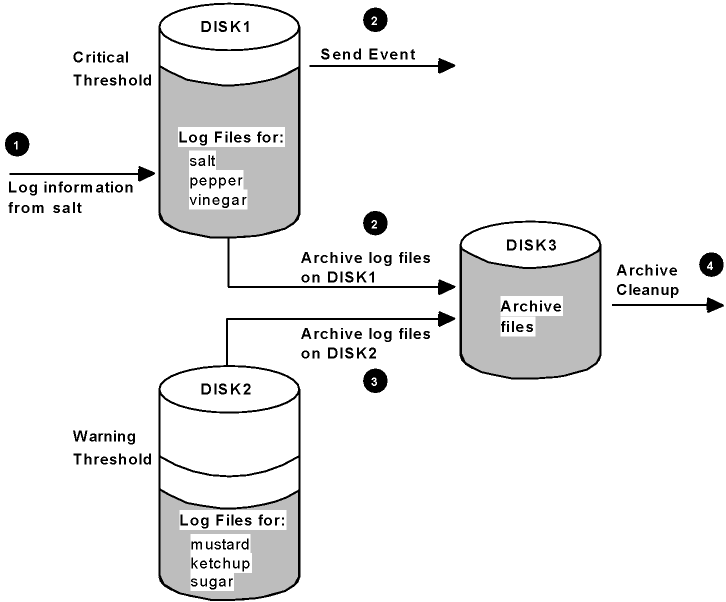
Unless you archive the log files on a regular basis, the disk containing your log files will start to get full. Console Manager provides two filespace thresholds for this situation, each specified as a percentage of the total available logging space:
You can change the percentage value for these thresholds (see the chapter “Modifying the Configuration Database” for more information). If the critical threshold is reached, you can also set the number of hours of log data that the archive process is to archive (see the chaoter “Modifying the Configuration Database” for more information).
Also, if the disk containing the archive area becomes full, then Console Manager activates an archive cleanup process. By default, this process deletes archive log files that are older than a 24 hours. You can change the action routine that performs this activity. See the chapter “Supplied Action Routines” for details on how to do this.
Note: We strongly recommend that you keep your archive area, and the area for the live log files, on separate disks or partitions.
The following figure shows an example of using multiple disks for log and archive files. It also shows what happens when the critical threshold level is reached, and the archive area becomes full. The main stages in the process, as depicted in the figure, are as follows:
|
Copyright © 2010 CA.
All rights reserved.
|
|