

The Jobs table displays details about all of the scheduled jobs that are associated with Management Profiles and Network Profiles.
To view scheduled jobs, click the Management Link then do one of the following actions:
The scheduled jobs appear in the Jobs table. The Jobs tab maintains a history of completed and failed scheduled jobs. Click the completed or error jobs links to view the logs for the selected job. The completed and the error jobs are archived. The archiving of the jobs is based on the following configuration information available in the Administration tab:
Specifies the number of records to exceed before a completed job history archive is created.
Default: 500
Specifies the number of records to skip before job history archiving remainder.
Default: 200
Specifies the number of records before a completed job history archive is created.
Default: 200
CA Configuration Automation® Connector Guide
The Catalyst Integration tab displays the catalyst jobs, and the Export Summary tab lists the successfully exported or failed CIs. You can view the export summary details of the executed catalyst jobs from the Management or Administrator link. You can export the failed CIs for a selected Catalyst Job while exporting the data to CA Catalyst.
Follow these steps:
The Profile details (using the Management profile), or the Job details (using the Administrator link) page lists the total count of the exported CIs, successfully exported CIs, and failed CIs as part of the Catalyst job.
You can run catalyst jobs, refresh the export summary, and export failed summary to an excel file from the Actions drop-down.
The excel file contains the Summary sheet that displays the Job Name and Job Description. The subsequent worksheets illustrate the failed CIs for the selected Catalyst Job.
If there are failed CIs, a new worksheet is created for each USM Type or Category. All the worksheets have unique ID along with the USM Type or Category name.
Note: For further reference, view the table that maps ID with the USM Type or Category name.
Note: The USM web view is successfully launched only when you configure the catalyst.server.name and catalyst.server.port properties.
The source information of the CIs is listed failed during the export to CA Catalyst when the job was run as shown in the following illustration:
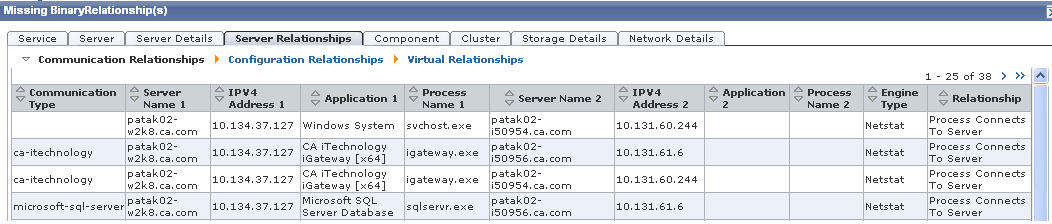
Note: For more information about the failed CIs and how to resolve the errors, see the CA Configuration Automation Connector Guide.
|
Copyright © 2014 CA.
All rights reserved.
|
|