

Softagent technology enables a greater amount of server data to be discovered using Microsoft’s Windows Management Instrumentation (WMI) connections on Windows systems. WMI discovers hardware and system characteristics, and is also used to access the Remote Registry Service to perform a complete discovery of all applications installed on the system.
Note: The Remote Registry Service on Windows 7 operating systems is not started by default. If you expect information to be gathered from this operating system, ensure that the Windows Management Instrumentation service is installed and running. You can test a connection to it by executing wbemtest.exe from the command line. Once launched, click the Connect button at the top and enter root\cimv2 as the Namespace, and then click Connect. Then click the Enum Classes button, select Recursive, and then click OK. You should see hundreds of classes listed.
A Softagent probe requires credentials for the servers from which it collects data. After the Softagent establishes a connection with a host using WMI or web services, it can collect the following data:
Providing correct credentials is the key to a successful Softagent discovery For example, if valid credentials for a hosting server are provided, then virtual relationships for all currently running guest servers under it are created. If valid credentials for a managing server are provided, then virtual relationships for all hosting servers and currently running guest servers under it are created.
The credentials in the credential vault include an order of precedence. The credentials at the top of each list are tried first. You may have proper administrative credentials for a given server supplied as the third element in the list, but if the first element includes the credentials for a valid user without administrative privileges on that server, your network scan will not be able to properly discover the details of that server. NDG uses the first set of credentials that successfully connects to the remote server. If credentials fail, they are not retried.
Most Network Scan Policies can be run with or without the use of Softagents and are independent of the type of scan that is being run. The use of Softagents can be considered as a second pass over all the discovered entities.
The success of Softagents gathering information from servers and devices is predicated on the following:
How Does NDG Use WMI?
NDG Windows Softagent Discovery leverages Microsoft’s Windows Management Instrumentation (WMI) services to discover the following Windows Server configuration:
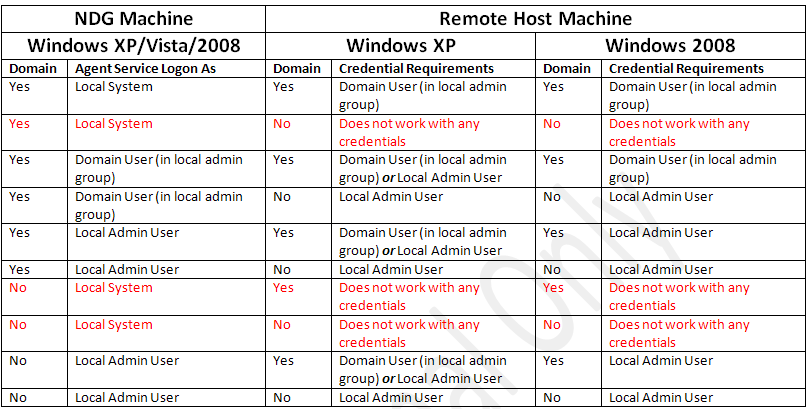
WMI services may require the NDG to be deployed to every Windows Domain in the environment. The default CA Network Discovery Gateway (candgateway.exe) service properties may need to be modified from “Log on as” Local System account to be a Windows domain user if NDG must discover Windows Server 2008 and Vista systems within the domain. These Windows operating systems include WMI services that require an administrative domain user to correctly establish a connection. This same limitation also means that NDG should be deployed to a computer that is not part of a Windows domain so that it can discover other computers that are not members of a Windows domain.
Note: The Local System account also discovers older Windows systems correctly.
In an IPv6 environment, NDG must be installed on a Windows Server 2008 or Vista system in order to establish successful WMI connections. See http://msdn.microsoft.com/en-us/library/aa391769(VS.85).aspx for details. The MAC address and physical network adapter information will not be available for machines other than Windows Server 2008 and Vista systems. Search the following document for the term IPAddress: http://msdn.microsoft.com/en-us/library/aa394217(VS.85).aspx.
WMI leverages DCOM communication. If there are issues with DCOM on your server, or if DCOM is suspected, refer to the Microsoft TechNet website, including http://technet.microsoft.com/en-us/library/cc940601.aspx for more information.
The following table contains information about remote host computers’ ability to access NDG using WMI in a Windows environment. These WMI rule tables have been produced by testing the combinations listed in the table. NDG is limited by Microsoft’s support of WMI, which may vary by version of Windows.
Note: The information in the tables is based on internal testing that was performed for specific versions of WMI. Due to the nature of WMI, the information in these tables should be considered to be general guidelines for understanding how the NDG Softagent accesses the various operating systems.
|
NDG Machine |
Remote Host Machine |
|
||||
|
Platform |
Domain? |
Agent Service Logon As |
Platform |
Domain? |
Agent Service Logon As |
WMI Success? |
|
Windows 2003 R2 Std |
Yes |
Local Admin User |
Windows 2003 Std SP2 |
Yes |
Domain credential |
Yes |
|
Windows 2003 R2 Std |
Yes |
Local Admin User |
Windows 2003 Std SP1 |
Yes |
Domain credential |
No |
|
Windows 2003 Std SP1 |
Yes |
Local Admin User |
Windows 2003 R2 Std |
Yes |
Domain credential |
Yes |
|
Windows 2003 Std SP1 |
Yes |
Local Admin User |
Windows 2003 R2 Std |
Yes |
Domain credential |
Yes |
|
Windows 2003 R2 Std |
Yes |
Domain User (in local admin group) |
Windows 2003 Std SP2 |
Yes |
Local Admin credential |
Yes |
|
Windows 2003 R2 Std |
Yes |
Domain User (in local admin group) |
Windows 2003 Std SP1 |
Yes |
Local Admin credential |
Yes |
|
Windows 2003 Std SP1 |
Yes |
Domain User (in local admin group) |
Windows 2003 R2 Std |
Yes |
Local Admin credential |
No |
|
Windows 2003 Std SP1 |
Yes |
Domain User (in local admin group) |
Windows 2003 R2 Std |
Yes |
Local Admin credential |
No |
The following table shows NDG’s Accessibility to Remote Hosts using Windows XP, Vista, 2008 Operating Systems.
|
Copyright © 2013 CA.
All rights reserved.
|
|