

Integration Configuration › How to Install and Configure the Integration
How to Install and Configure the Integration
The following information and diagram provide a summary of how to configure the CA CMDB Export Report in CA Business Intelligence to integrate CA SDM r12.7 and CA Configuration Automation r12.8:
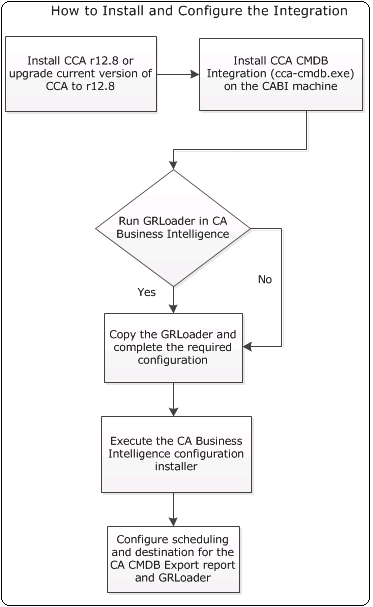
- Install CA Configuration Automation r12.8 or upgrade your current version of CA Configuration Automation to r12.8.
- (Optional) Run GRLoader from a Remote MDR before launching the integration patch installer.
- Launch the integration patch installer (cca-cmdb.exe) from the dvd1 directory on the CA Configuration Automation CMDB Integration Patch distribution on the computer that has CA Business Intelligence and follow the steps in the installer.
Note: The installer requires a JRE version of at least 1.5. You must set the PATH environment variable to jre\bin\ on the server.
- The installer performs the following tasks:
- Imports the BIAR file that contains the BOXI_GRLoader program object, the CCA to CMDB Group, and the CA CMDB Export report that supports SQL Server or Oracle as the data source for the CA Configuration Automation r12.8 database. This file also contains the CA Business Intelligence Universe and connection properties. This report extracts data from the CA Configuration Automation database and presents it in XML format.
- Deploys the Client Access Framework (CAF) page WAR files to the CA Business Intelligence server. The CAF provides the prompt page for the report that captures required report parameters for the CA CMDB Export report.
- (Optional) Configures the email and file servers that specify which users receive a notification about the export report.
Note: If you do not set up notifications and want to view the output of successful instances, you view the History of the object in CA Business Intelligence. Click the instance title and use any text editor to open the output. Optionally, you can configure the email and file system servers in CA Business Intelligence if you did not configure them during this installation.
- (Optional) Configures the program object in CA Business Intelligence.
The program object provides the script that executes the report and lets you add the JAR file responsible for scheduling the report and data export.
- Schedule the BOXI_GRLoader Program Object in CA Business Intelligence.
- Schedule the CA CMDB Export Report in CA Business Intelligence.
The GRLoader takes the generated XML file from the report and loads data into CA CMDB.
More information:
How to Configure the GRLoader Environment in CA Business Intelligence
Copyright © 2013 CA.
All rights reserved.
|
|