

CA Business Intelligence r3.2 or r3.3 SP1 provides the integration of the CA CMDB component of CA SDM r12.7 with CA Configuration Automation r12.8. CA Business Intelligence deploys the CA CMDB Export report that delivers an XML file that contains the CA Configuration Automation information, which is then loaded into CA CMDB using the GRLoader. GRLoader is a CA CMDB utility that lets you create or update a CI and its relationships in your Mangement Database (MDB). GRLoader maps CA CMDB families, classes, and relationships to CA Configuration Automation object types through the GRLoader. CA SDM r12.7 installs GRLoader automatically.
Important! You must install CA Business Intelligence for this integration to operate successfully.
The following information and diagram provide a summary of how the integration works:
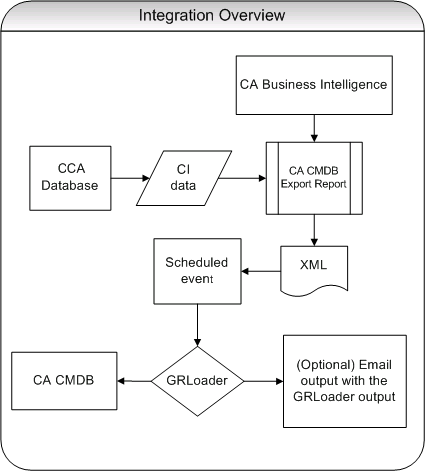
GRLoader loads the XML data from CA Configuration Automation to CA CMDB.
GRLoader uses this destination and waits for an event generated by a successful generation of the XML file and loads it into CA CMDB.
Note: GRLoader does not send email notification by default, but you can optionally configure the email or file system of the destination server to send a notification to a user that you specify. After BOXI_GRLoader schedules successfully, the output is sent to the user as an email notification.
After you complete the integration, you can launch CA Configuration Automation in-context of a CI from CA CMDB. You view the CI details in CA CMDB and launch CA Configuration Automation from a URL you configure in CA SDM r12.7.
|
Copyright © 2013 CA.
All rights reserved.
|
|