

|
|
|
System defaults are initially entered during the install process and, after installation is complete, can be changed by using the System Default panel. Changes to the fields in this panel affect the default operation of CA Compress.
To enter/change the system defaults
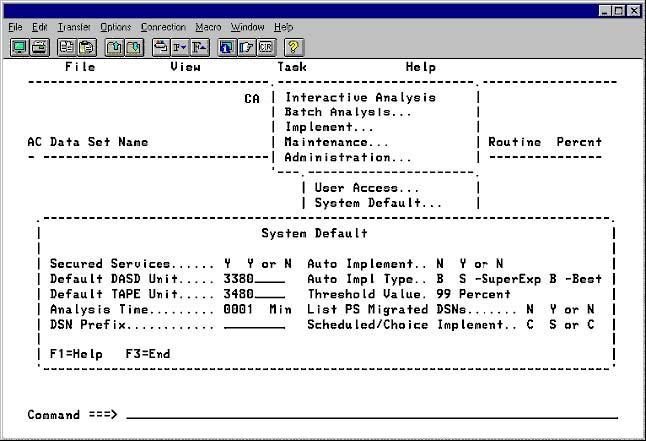
|
Field Names |
Contents |
|---|---|
|
Secured Services |
Indicates whether the CA Compress services are to be protected from unauthorized use. Valid entries are Y/N. For more information about how this field affects user access, see User Access in this chapter. |
|
Auto Implement |
The value in this field turns on or off (Y/N) the Auto Implement feature. Auto Implement Y means that if a data set meets all the criteria during Interactive or Batch Analysis, it is automatically implemented for compression. When set to N, Analysis only analyzes. |
|
Default DASD Unit |
The default DASD unit is SYSDA. The value in this field can be changed on the panel. It can also be changed when the Control File is initialized. The value is the unit specification used for any DASD device when work files are allocated or JCL is generated. |
|
Auto Impl Type |
The value in this field determines the compression routine to be used when Auto Implement is on (set to Y). The selections are Super Express or the Best of Standard Tables 1 through 6 (S/B). |
|
Default TAPE Unit |
The normal tape unit is TAPE. The default value can be changed on this panel. |
|
Threshold Value |
The value in this field sets the minimum compression percentage that must be achieved, when Auto Implement is on (set to Y), for the data set to be automatically implemented for compression. |
|
Analysis Time |
The value in this field, expressed in number of minutes, sets the maximum time limit for an interactive file analyze (1 to 9999). When this limit is exceeded, CA Compress stops and asks you whether to create a batch job using the JCL that was built for the online job. |
|
List PS Migrated DSNs |
This field applies to PS data sets only. Y means that PS data sets are listed after they are migrated. N means that they are not. |
|
DSN Prefix |
This optional field contains the high-level node of the data set name to be used as a work file. |
|
Scheduled/Choice Implement |
The value in this field determines the implementation type. The selections are Scheduled (S), or Choice (C). C gives a variety of selections, including scheduled. |
| Copyright © 2012 CA. All rights reserved. |
|