

|
|
|
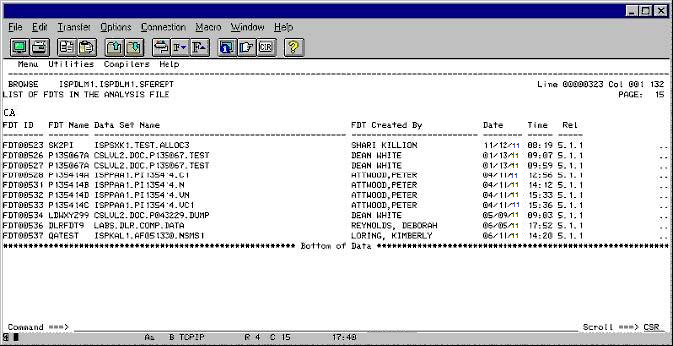
To list the FDTs in the Analysis File
|
Field Names |
Contents |
|---|---|
|
FDT ID |
The control ID for the FDT. The numeric portion of the ID is the FDT number, which is used in any error message. |
|
FDT Name |
This is the load module name for the FDT. |
|
Data Set Name |
The data set name associated with the FDT ID and name. |
|
FDT Created By |
The name of the person who generated the FDT. |
|
Date |
The date the FDT was generated. |
|
Time |
The time the FDT was generated. |
|
Rel |
The version of the CA Compress Interactive User Interface used to generate the FDT. |
| Copyright © 2012 CA. All rights reserved. |
|