

|
|
|
Since there are many differences between VSAM and PS data sets, VSAM Patterns and PS Patterns are completely distinct. In other words, VSAM data sets do not match on a PS Pattern, and PS data sets do not match on a VSAM Pattern.
The implementation flow for patterns is essentially the same as for data sets. As with data set implementation, an implementation line command tells the IUI that you want to implement the pattern using the selected compression algorithm. Pressing the Enter key confirms your choices. Implementation is performed for each work list entry you selected when you select Implement from the Task menu.
Since patterns are not data sets, there is no data to analyze, so any pattern being implemented with a custom routine must use an existing FDT. Instead of H, V, or T, the custom implementation line commands, you code F to indicate that you want to use an FDT. When you select and confirm the F line command, the status field displays *CUSTFDT. Selecting Implement from the Task menu displays the Valid FDT Name panel. Enter the name of an FDT generated from data which best represents the data sets which are implemented from the pattern. This selection is important, since compression efficiency and performance both suffer if the data does not closely resemble what was used to create the FDT.
The RDL must be general enough to accurately describe any data set that matches the pattern. For example, if the RDL is C1F80, which describes a fixed length record of 80 bytes, CA Compress fails any record having more or less than 80 characters.
For patterns, the IUI permits only Scheduled implementation for VSAM (LOAD or OPEN) and EFFDATE=today for PS.
The steps that follow assume that the system defaults are set to give you a choice of implementation modes. After selecting Implement (and after specifying the FDT name if Huffman, SHRVL, or Tailored was selected) the Implement Pattern Compression panel appears.
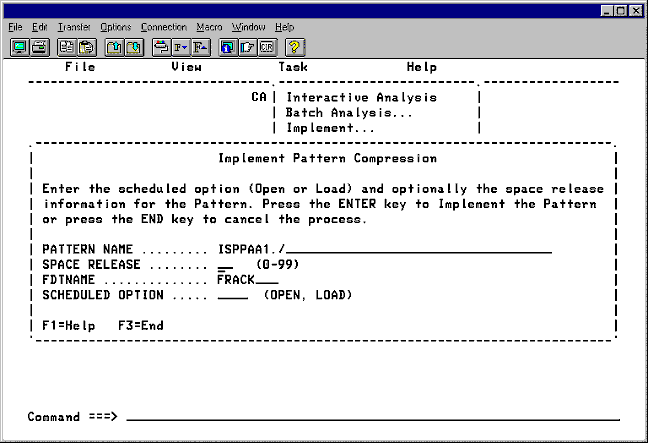
For VSAM:
In the SCHEDULED OPTION field, type OPEN or LOAD and press Enter.
Any data set that matches the pattern is implemented for compression the next time it is opened for output.
Any data set that matches the pattern is implemented for compression the next time it is loaded.
Note: OPEN or LOAD refers to when compression is to be implemented. After the specified event occurs on a data set and compression is implemented, the data set changes from OPEN or LOAD, to SCHED, which means the scheduled data set is now compressed.
The steps that follow are for Physical Sequential Patterns. After selecting Implement (and after specifying the FDT name if Huffman, SHRVL, or Tailored is selected) the Implement Physical Sequential Pattern Compression panel is displayed.
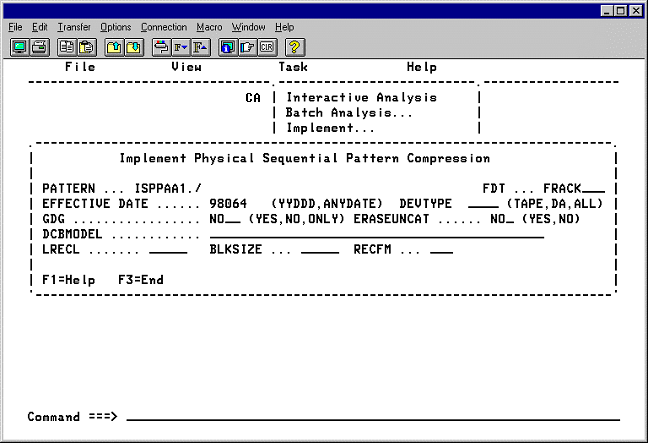
For PS:
| Copyright © 2012 CA. All rights reserved. |
|