

The Software Deployment Service (SDS) facilitates product deployment. Deployment is a process of copying SMP/E target libraries from a driving system (where the CA CSM application server is running) to a target (remote destination) system. The target system could be the local z/OS system, a remote z/OS system, a staging system, or a sysplex.
Before you can deploy a product, complete the following tasks:
Note: If you do not set up remote credentials for target systems, CA CSM prompts you to define remote credentials before it performs actions that require access to the systems.
You perform the following high-level tasks to deploy your products using CA CSM:
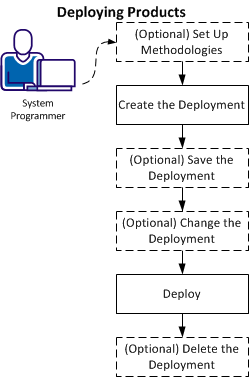
Note: You can also set up methodologies when creating a deployment.
After the deployment process completes, the product is ready for you to configure.
Note: Sometimes, there are other product-specific steps to perform manually outside of CA CSM. For more information, review the Installation Guide for your product.
|
Copyright © 2015 CA Technologies.
All rights reserved.
|
|