

CAISSF (CA International Standard Security Facility) is a subcomponent of the CAIRIM service that provides an external security mechanism for controlling and monitoring access to all CA-defined resources.
CAISSF is integrated into many CA enterprise solutions and other CSS services also is use it. CAISSF provides security services for user sign-in, resource access control, process usage control, and recording and monitoring violation activity. These security services work with any z/OS external security product, including CA ACF2, CA Top Secret, and IBM RACF.
Note: For information about the features and functions of the security interfaces to CA ACF2 and CA Top Secret for a CA Technologies product, see the documentation for that product.
Product usage is tracked for LMP key licensed or maximum concurrent seat license usage CA Technologies products. CA Technologies products that employ product usage monitoring, invoke a CA common service at strategic points in time to record usage. The CA product usage common service uses the IBM z/OS Product Registration component to perform the tracking, recording and reporting. The registered product information is stored as z/OS SMF (System Management Facility) type 89 subtype 2 records. z/OS generates these particular SMF record types on an SMF interval basis as defined by the installation.
The SMF type 89 records are collected over the required reporting period. A registered software usage report can be produced from the SMF type 89 records. The usage report is generated using the IBM z/OS product usage report utility program, IFAURP. IFAURP supports specification of software vendor which allows reporting of CA products only.
Follow these steps:
Specify in the logical PARMLIB SMFPRMxx member, the records that SMF is to record. The Software Product Registration Report produced by the IFAURP report utility requires the SMF type 89, subtype 2, records as input. Select SMF type 89 in the SMFPRMxx member, or minimally, select the SMF type 89, subtype 2 records. For information describing the recording of SMF type 89 records, see the IBM publication, z/OS MVS System Management Facilities (SMF).
Typically an installation has existing procedures and methodologies for collecting and archiving the SMF records for later retrieval and reporting. Verify that the SMF type 89, subtype 2, records are included in the installation managed SMF historical data sets. Record these records for at least as long as production of the Software Product Registration Report requires.
The IBM product registration reporting utility, IFAURP, is used to analyze and summarize the SMF type 89, subtype 2, records. These records are used to produce the Software Product Registration Report. This report details the product maximum concurrent registration for each CA product and validates seat license usage compliance. For information regarding use of the IFAURP report utility, see the IBM publication, z/OS MVS Product Management.
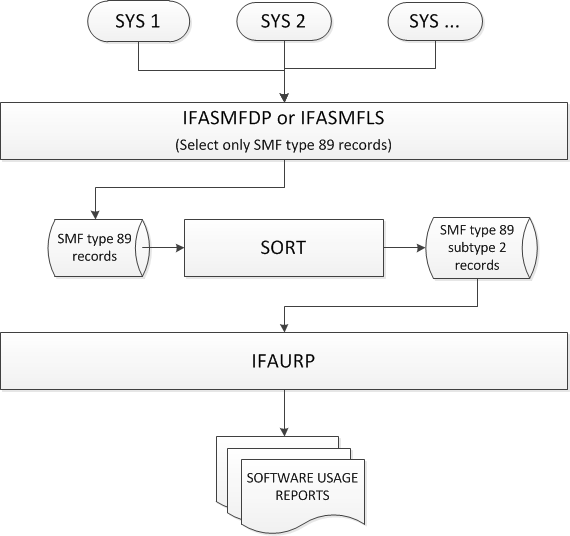
When producing the Software Product Registration Report, supply the SMF type 89, subtype 2 records from all required systems for the desired reporting period. The general-purpose SMF dump utility, IFASMFDP, can be used to preprocess the SMF records. If the SMF records are being recorded to a z/OS log stream, IFASMFLS is used instead of IFASMFDP. Once the target SMF records have been selected, they are sorted before presenting them to the IFAURP utility.
The following diagram illustrates the data flow required to produce reports through the IFAURP report utility:
Sample JCL for Generating the Software Product Registration Report
This sample code illustrates:
//jobname  JOB (acct code),'Sample Usage Rept',CLASS=K,
//    MSGCLASS=D,MSGLEVEL=(1,1),NOTIFY=&SYSUID.
//*
//********************************************************************
//*                                                                  *
//* Member Name:  PRDREPTS                                           *
//*                                                                  *
//* Descriptive Name:  Sample job to extract SMF type 89 records     *
//*                    and generate a registered product             *
//*                    usage report.                                 *
//*                                                                  *
//* Function:                                                        *
//*   This job does the following:                                   *
//*                                                                  *
//*   1) Extract type 89 records from SMF collection data set(s)     *
//*   2) Sort type 89 records                                        *
//*   3) Invokes Usage Report Program                                *
//*                                                                  *
//*                                                                  *
//* Notes:  Refer to the IBM publication, "MVS Product Management",  *
//*         Chapter 3 "Reporting Product Information" for detailed   *
//*         information regarding the use and execution of the       *
//*         IFAURP usage reporting utility program.                  *
//*                                                                  *
//*                                                                  *
//********************************************************************
//*
//********************************************************************
//*                                                                  *
//*        Extract SMF Type 89 Records                               *
//*                                                                  *
//********************************************************************
//*
//XTRACT89 EXEC PGM=IFASMFDP,REGION=4M
//SYSPRINT DD   SYSOUT=*
//*
//INDD1    DD   DISP=SHR,DSN=SMF.sys1.collect.data
//INDD2    DD   DISP=SHR,DSN=SMF.sys2.collect.data
//INDD3    DD   DISP=SHR,DSN=SMF.sys3.collect.data
//*
//OUTDD1   DD   DSN=&&DUMP89,DISP=(NEW,PASS),
//    UNIT=SYSALLDA,SPACE=(CYL,(5,10)),
//    DCB=(LRECL=32760,BLKSIZE=4096,RECFM=VBS,BUFNO=10)
//*
//SYSIN    DD   *
 INDD(INDD1,OPTIONS(DUMP))
 INDD(INDD2,OPTIONS(DUMP))
 INDD(INDD3,OPTIONS(DUMP))
 OUTDD(OUTDD1,TYPE(89))
 DATE(yyddd,yyddd)
/*
//*
//********************************************************************
//*                                                                  *
//*        Sort the SMF type 89 records into a temporary data set    *
//*                                                                  *
//********************************************************************
//*
//SORT89   EXEC PGM=SORT,REGION=6M
//SYSOUT   DD   SYSOUT=*
//SORTIN   DD   DSN=&&DUMP89,DISP=(OLD,DELETE)
//SORTOUT  DD   DSN=&&SORT89,DISP=(NEW,PASS),
//    UNIT=SYSALLDA,SPACE=(CYL,(5,10),RLSE),
//    DCB=*.SORTIN
//SYSPRINT DD SYSOUT=*
//SYSOUT   DD SYSOUT=*
//SORTDIAG DD DUMMY
//SORTWK01 DD UNIT=SYSALLDA,SPACE=(CYL,(10),RLSE)
//SORTWK02 DD UNIT=SYSALLDA,SPACE=(CYL,(10),RLSE)
//SORTWK03 DD UNIT=SYSALLDA,SPACE=(CYL,(10),RLSE)
//SYSIN    DD   *
    OPTION VLSHRT
    SORT FIELDS=(5,250,CH,A)
    INCLUDE COND=(6,1,BI,EQ,X'59')
/*
//*
//********************************************************************
//*                                                                  *
//*        Generate Software Usage Reports                           *
//*                                                                  *
//********************************************************************
//*
//IFAUSAGE EXEC PGM=IFAURP,REGION=4M,
//    PARM='PRODUCT'
//STEPLIB  DD   DSN=SYS1.SIFALIB,DISP=SHR
//SMFDATA  DD   DSN=&&SORT89,DISP=(SHR,PASS)
//SYSUDUMP DD   SYSOUT=*
//SYSUSAGE DD   SYSOUT=*
//SYSMSGS  DD   SYSOUT=*
//SYSPRINT DD   SYSOUT=*
//SYSHIN   DD   DUMMY    DSN=<input history file spec>
//SYSHOUT  DD   DUMMY    DSN=<output history file spec>
//SYSIN    DD   *
*
* Customer name and address
*
  CUSTOMER(
           NAME('B & K Enterprises, Inc')
           ADDRESS(
                   '1313 Mockingbird Lane'
                  ,'Mockingbird Heights, CA  90210'
                  )
           CONTACT('M J Borghi')
           PHONE('(555) 555-5555')
          )
*
* Vendor name, address, and installation's customer number
*
  VENDOR(
         PRODOWNER('CA')
         NAME('CA Technologies')
         ADDRESS(
                 'One CA Place'
                ,'Islandia, NY  11749'
                ,'Fax: 1-631-342-6800  ATTN: Usage Pricing'
                )
         CODE(1234567)
        )
*
/*
//
|
Copyright © 2014 CA Technologies.
All rights reserved.
|
|