

Home realm detection enables users who have authenticated with their domain credentials to log into a target application without needing to select an identity provider on the CA CloudMinder login page.
For example, your company uses Google Apps, a software resource outside of your network environment. Users who have logged into the network with domain credentials should be able to access Google Apps without having to select an identity provider in the CA CloudMinder login page.
The following steps describe the process that takes place when home realm detection is enabled.
The user is already logged into the corporate domain.
ONPREM_AUTH_METHOD = authentication method name.
authentication method name
The name of the authentication method object in the User Console. The authentication method is associated with the application that the user is trying to access in the User Console.
You enable home realm detection in the corporate proxy server.
Prerequisites:
Configuration:
Configure the proxy to insert a header into all requests for CA CloudMinder.
The header resembles the following example:
ONPREM_AUTH_METHOD = authentication method name.
authentication method name
The name of the authentication method object in the User Console.
In the following example, the authentication method object name is Test123.
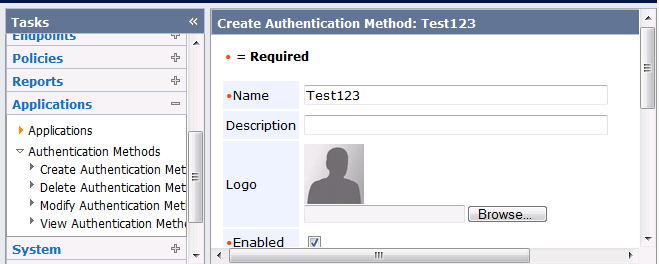
The method for configuring the proxy server to insert a header depends on the proxy server that you are using. The following text illustrates a sample configuration for Fiddler, which is simulating proxy functionality:
if(oSession.HostnameIs("cloudMinder.domain.com")){
oSesssion.oRequest["ONPREM_AUTH_METHOD"] = "Test123";
}
Note: For information on inserting headers into requests, see the documentation for your proxy server.
The following example describes how to enable domain users at Forward, Inc. to access Google Apps without having to select an authentication method in the CA CloudMinder login screen.
This example assumes the following configuration:
In CA SiteMinder, the following configuration is defined:
/affwebservices/redirectjsp/redirect.jsp
https://test.forwardinc.com/affwebservices/redirectjsp/redirect.jsp
In this partnership, the following configuration exists:
https://domain/chs/login/tenant_name/application in User Console
For example:
https://test2.cloud.com/chs/login/ForwardInc/GoogleApps
https://domain/affwebservces/public/saml2sso?SPID=SPID of target application
For example:
https://test2.cloud.com/affwebservces/public/saml2sso?SPID=google.com/a/ggl.test.com
This URL must match the Launch URL that you define in the application.
Follow these steps:
|
Copyright © 2014 CA.
All rights reserved.
|
|