

The Security Token Service (STS) provides a WS-Trust-based mechanism for token issuance and translation. The WS-Trust specification includes extensions to the WS-Security standard. WS-Trust specifies the following:
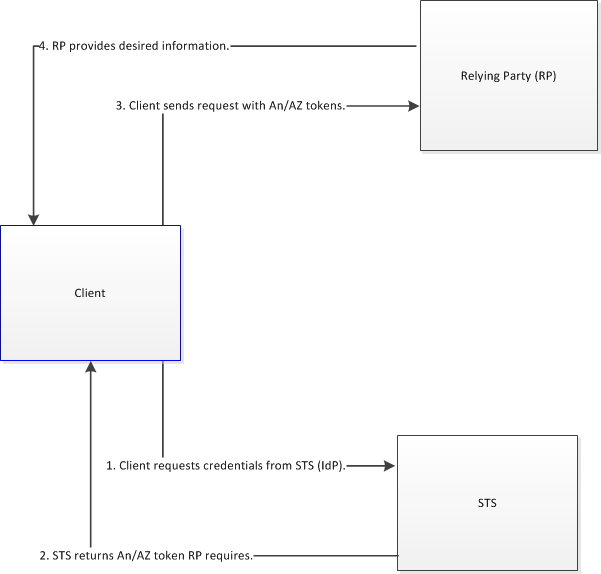
The main function of an STS is to serve as a third party that can provide credentials for a relying party. The STS is an authority trusted by the client and the relying party. The STS client application is WS-Trust literate; it generates token requests. You can use the STS to issue a security token, which is a collection of claims such as name, role, and authorization code required for the client to access the relying party.
The following diagram illustrates authentication to a relying party using the STS:
Each instance of the STS contains an embedded SOA agent. Web service requests for security tokens are authenticated and authorized with the same functionality as the CA SiteMinder® SOA product. The STS supports WS-Trust 1.3/1.4 compliant requests for the issuing of a variety of security tokens.
The following list details the authentication schemes and token types that the STS supports for each:
WS-Username (digest), WS-X509, WS-SAML Holder-of-key (SAML 1.1 & 2.0), WS-SAML Bearer (SAML 2.0), SMSession
WS-X509, WS-SAML Holder-of-key (SAML 1.1 & 2.0), WS-SAML Bearer (SAML 2.0), SMSession
WS-Username (digest), WS-X509, WS-SAML Holder-of-key (SAML 1.1 & 2.0), WS-SAML Bearer (SAML 2.0), SMSession
WS-SAML Holder-of-key (SAML 1.1 & 2.0), WS-SAML Bearer (SAML 2.0), SMSession
WS-SAML Holder-of-key (SAML 1.1 & 2.0), WS-SAML Bearer (SAML 2.0), SMSession
WS-SAML Holder-of-key (SAML 1.1 & 2.0), WS-SAML Bearer (SAML 2.0), SMSession
WS-Username (digest), WS-X509, WS-SAML Holder-of-key (SAML 1.1 & 2.0), WS-SAML Bearer (SAML 2.0), SMSession
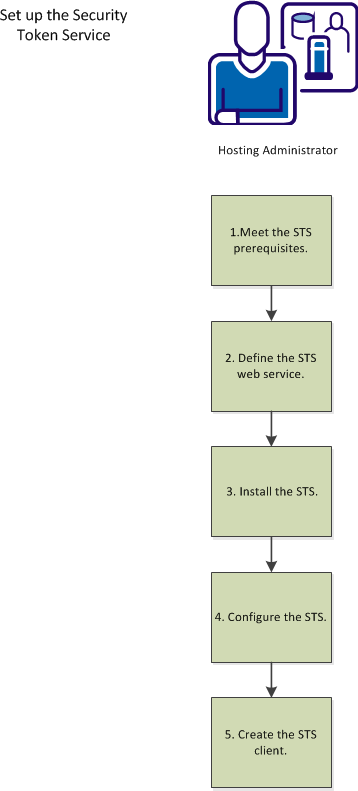
The following diagram illustrates the process of setting up the STS:
|
Copyright © 2014 CA.
All rights reserved.
|
|