

Single Sign-On Service › SSO Getting Started Guide › SSO using a Third-party IdP and Self-registration › Configure Federated Partnerships
Configure Federated Partnerships
A common SSO scenario is to allow consumers access to an application using credentials from an account at a third-party site. The third-party site acts as an external Identity Provider (IdP) relative to CA CloudMinder.
The following information for the partnership applies:
- A third party is the IdP that authenticates the user. For example, Facebook.
- CA CloudMinder has two partnership roles:
- As the SP in relation to the third-party IdP.
- As the IdP that provides the assertion to the SSO application, which is the SP.
- SAML 2.0 is the federation profile in use.
Set up two partnerships:
- IdP (third-party) to SP CA CloudMinder
- SP CA CloudMinder to IdP (application)
Note: In many of the procedures, the term asserting party refers to the Producer or Identity Provider. The term relying party refers to the Consumer, Service Provider, and Resource Partner.
The following figure shows the configuration tasks required for a partnership:
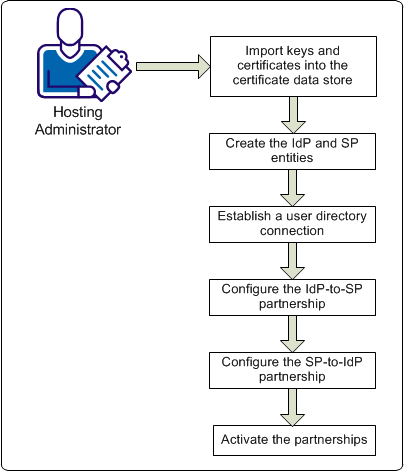
The procedures are detailed in the following topics:
- Import keys and certficates into the certificate data store.
- Create the IdP and SP entities
- Establish a user directory connection.
- Configure the IdP-to-SP partnership.
- Configure the Sp-to-IdP partnership.
- Activate the partnership.
Copyright © 2014 CA.
All rights reserved.
|
|