

Consumers can have access to an application using credentials from an account with a third-party site. The third-party site acts as an external Identity Provider (IdP) relative to CA CloudMinder.
In this scenario, a user accesses a protected resource. The user is shown a page that displays a choice of third-party sites. From the list, the user chooses the third party where they have an account. After successful authentication, the third-party returns the user to the cloud system.
At the cloud system, CA CloudMinder can redirect the user to a self-registration page. The page enables the user to register and establish a user record in the cloud system user directory. After successful registration, CA CloudMinder redirects the user to the requested application.
In this scenario, the following information applies:
The configuration tasks are shown in the following figure:
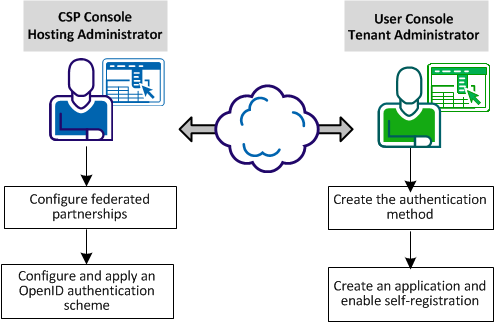
The following procedures describe each task in detail:
|
Copyright © 2013 CA.
All rights reserved.
|
|