

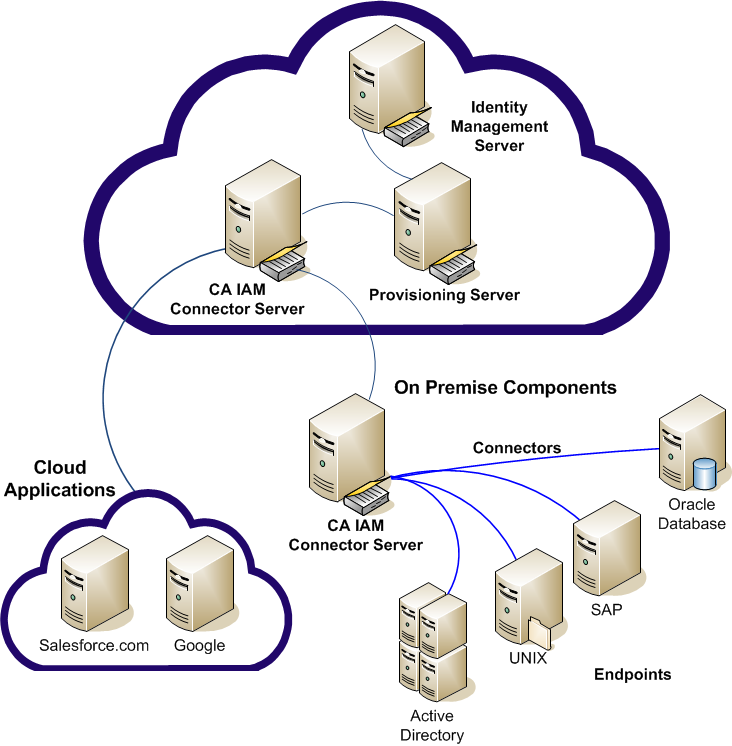
With Identity Management, you can manage accounts on multiple systems from a single user interface, the User Console. The accounts are on systems that are referred to as managed endpoints, or simply endpoints. In the following example, you manage users on two cloud endpoints and four on-premise endpoints. You can assign accounts on any combination of endpoints to a user. When you integrate the endpoint, Identity Management associates each endpoint account with a user in the provisioning directory.
Integrating a managed endpoint is a seven-step process as follows and involves different types of administrators.
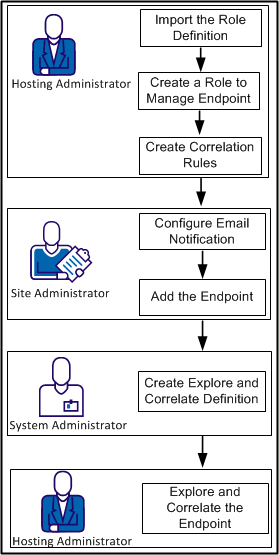
The following procedures describe how to integrate endpoints, so that endpoint accounts can be managed from the User Console.
|
Copyright © 2013 CA.
All rights reserved.
|
|