

Identity Management Service › Identity Management Administration Guide › Workflow › Use Workflow Control - Template Method › Place Admin Tasks under Workflow Control - Template Method
Place Admin Tasks under Workflow Control - Template Method
As an administrator, you can place admin tasks under workflow control using the template method.
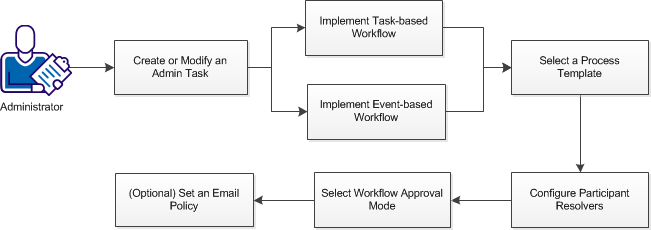
Follow these steps:
- In the User Console, select Roles and Tasks, Admin Tasks, Modify (or Create) Admin Tasks.
- Search for the task you want under workflow control, and click Select.
- Do one of the following:
- Select a process template.
- Configure participant resolvers.
- Select workflow approval mode.
- (Optional) Set an email policy for the workflow process.
Note: If you select the EscalationApproval process, a field named Approval Timeout (min) is displayed. This field is specified in minutes and cannot be empty. By default, the time is set to 60 minutes.
After workflow control is configured, a user with the appropriate role performs the admin task, and the designated workflow participant approves or rejects the task or event.
Copyright © 2013 CA.
All rights reserved.
|
|