

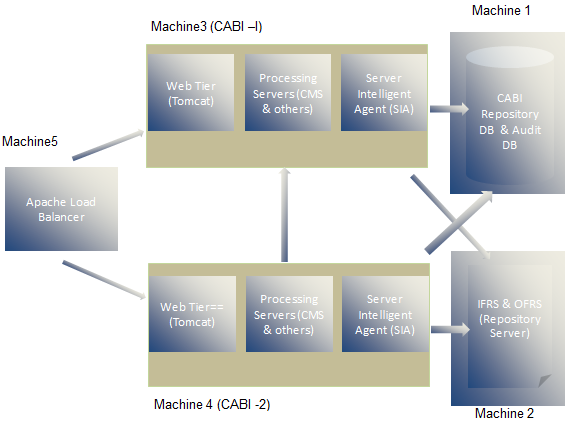
To support a high availability report server, this chapter describes installing CA Business Intelligence on Linux platform using Apache tomcat as the application server. The Apache HTTP Server is used as a load balancer. See the following diagram for details on this architecture.
Prerequisites
Complete the following prerequisites:
Machine1 (Database Server)
Install the Oracle server and create two databases, one for CMS and one for Auditing. See the Oracle documentation for instructions on how to install Oracle on Linux and how to create databases on Linux after installing Oracle.
Machine2 (File Repository Server)
Perform the following steps on File Repository Server Machine to configure and to start the NFS Server.
service nfs start
service nfs status
mkdir -p /home/nfs/cabi
useradd -s /bin/bash cabiuser
chown cabiuser /home/nfs/cabi
id cabiuser
append /home/nfs/cabi Machine*(rw,all_squash,anonuid=501,anongid=501) to /etc/exports file
exportfs -a
showmount -e Machine2
su cabiuser
mkdir frsinput frsoutput
Machine3
This non-root user creation is mandatory to install CA Business Intelligence on Linux.
See the CA Business Intelligence implementation guide for more information about the installation process.
Once the installation is complete, make sure that you are able to login into CMC through the web URL.
http://Machine3:8080/CmcApp
Machine 4
See the CA Business Intelligence implementation guide for more information about the installation process.
Make sure that you can log in into the CMC through the web URL.
http://Machine4:8080/CmcApp
Setup NFS client on both CA Business Intelligence machines:
Perform the following steps on both CA Business Intelligence machines (Machine3 and Machine4) to set up the NFS client, which is required to access a shared location in the file repository server.
mkdir -p /home/nfs/cabi
useradd -s /bin/bash -m cabiuser
chown cabiuser /home/nfs/cabi
add bansr02-I53529:/home/nfs/cabi /home/nfs/cabi nfs defaults 0 0 to /etc/fstab
mount -a
mount
su -cabiuser
cd /home/nfs/cabi
touch a
rm a
ls -alrt
cd /opt/CA/SharedComponents/CommonReporting3/bobje
./stopservers
cd data/frsinput
cp -r * /home/nfs/cabi/frsinput
cd ../frsoutput
cp -r * /home/nfs/cabi/frsoutput
cd ../..
./startservers
./ccm.sh -disable all -username Administrator -password adminpassword
After completing the preceding steps on any system, perform the following steps:
Machine 5
Perform the following steps to configure nodes in the cluster environment in load balancer server (Machine5) as a root user assuming you already have apache httpd server installed.
LoadModule jk_module /etc/httpd/modules/mod_jk.so
JkWorkersFile "/etc/httpd/conf/workers.properties"
JkMountFile conf/uriworkermap.properties
JkMount /servlet/* balancer
JkMount /*.jsp balancer
JkMount /jkmanager/* jkstatus
worker.list=balancer,jkstatus
worker.jkstatus.type=status

worker.worker1.port=8009
worker.worker1.host=Machine3
worker.worker1.type=ajp13
worker.worker1.lbfactor=1

worker.worker2.port=8009
worker.worker2.host=Machine4
worker.worker2.type=ajp13
worker.worker2.lbfactor=1

worker.balancer.type=lb
worker.balancer.balance_workers=worker1,worker2
worker.balancer.sticky_session=true
/jmx-console=balancer
/jmx-console/*=balancer
/web-console=balancer
/web-console/*=balancer
/*=balancer
/=balancer
/etc/init.d/httpd stop
/etc/init.d/httpd start
Load balancing configuration on both CA Business Intelligence machines:
Configure both the nodes in the cluster to accept request from the load balancer server instead of exposing its own web URL. Perform the following steps in CA Business Intelligence servers (Machine3 and Machine4).
<Connector port="8009" enableLookups="false" redirectPort="8443" tomcatAuthentication="false" maxThreads="400" minSpareThreads="25" maxSpareThreads="100" protocol="AJP/1.3" />
An Engine tag exists below this line. Append extra attribute jvmRoute="worker1" to this tag. (In the second CABI server, make the value"worker2").
Now you can access CMC using url http://machine5/CmcApp as well as infoview using http://machine5/InfoViewApp.
|
Copyright © 2013 CA.
All rights reserved.
|
|