

CA Directory is an LDAP-based directory server that hosts multiple CA CloudMinder data stores.
CA Directory provides the following functionality in CA CloudMinder:
Contains information about all of the managed users in CA CloudMinder.
CA Directory can contain millions of users.
Contains a representation of users who have accounts on endpoints such as Microsoft Exchange, Active Directory, and SAP. Users in the provisioning directory are called global users.
CA Directory securely stores the data of one tenant separately from the data of any other tenant. A tenant can never view or access the data of another tenant. User data and provisioning data is physically segregated into separate server instances, or DSAs, for each tenant. Any request that requires user or provisioning data contains information that identifies the request with a specific tenant. A router directs the request to the appropriate DSA.
The Policy Server provides the following functionality in CA CloudMinder:
In deployments that include Advanced Authentication, the Policy Server integrates with CA AuthMinder to support strong authentication methods, such as One Time Password (OTP), and Arcot PKI.
The CA SiteMinder Secure Proxy Server (SPS) is a stand-alone server that provides a proxy-based solution for access control.
The CA SiteMinder Secure Proxy Server uses a proxy engine that provides a network gateway for the enterprise. The SPS provides the following functionality in CA CloudMinder:
CA IdentityMinder provides the core functionality of CA CloudMinder, including profile and entitlement management, policies to support business rules, user self-service, and reports. You also perform most provisioning tasks in CA IdentityMinder.
The Provisioning Server allows administrators to provision accounts on endpoints such as email servers, databases, and other applications to end users. To communicate with the endpoint systems, you also install connector servers for endpoint-specific connectors, such as an SAP connector.
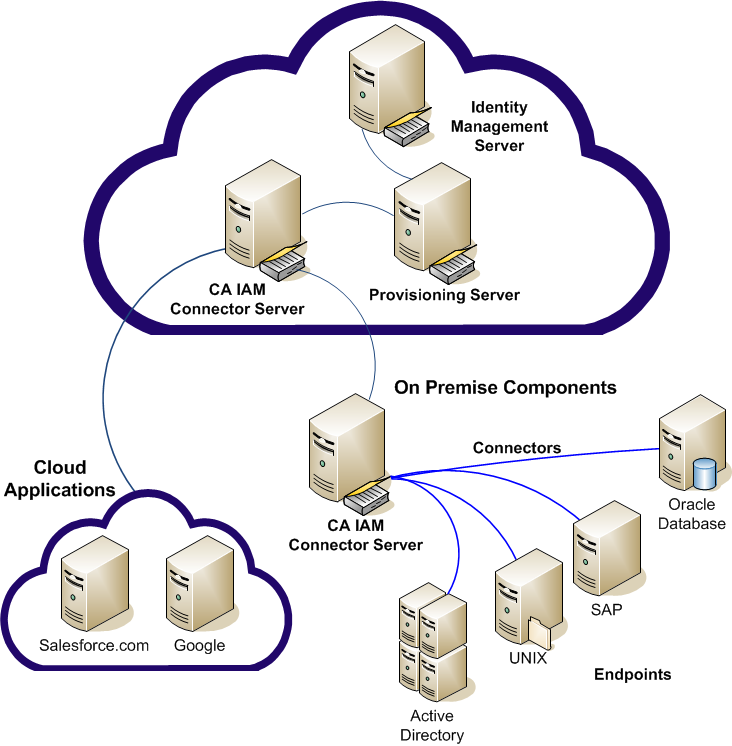
The CA IAM Connector Server manages connectors, software that enables communication between CA CloudMinder and an endpoint system. An endpoint can be any system that uses identities.
A typical deployment includes the following types of connector servers:
Directly manages cloud endpoints, such as Google Apps or Salesforce. The cloud CA IAM Connector Server is installed in the host data center.
Manages local endpoints in an internal network at the tenant site.
The tenant administrator can install a local version of the CA IAM Connector Server in their internal network and enable routing from the cloud.
Note the following requirements for the on-premise CA IAM Connector Server:
You can add support for new connectors on-premise or in the cloud without restarting any servers.
The following example shows a deployment that includes two cloud endpoints and four on-premise endpoints.
|
Copyright © 2013 CA.
All rights reserved.
|
|