

Administration Guide › Reporting › Running a Report › How to Request and View an Audit Report
How to Request and View an Audit Report
An audit report provides a historical record of operations that occur in an environment. Some examples of audit data include the following points:
- System activity for a specified period of a time
- User login and logout events while accessing a particular environment
- The tasks that a specific user performs
- A list of objects that were modified during a specific period of a time.
- The user assigned roles
- The operations which are performed for a particular user account.
The following is a list of default audit reports:
- Assign Revoke Provisioning Roles Report
- De-Provisioning Report
- Audit Details Report
- Pending Approval Tasks Report
- Reset Password Report
- Tasks Performed by Administrator
The following graphic illustrates the process to request and view an audit report:
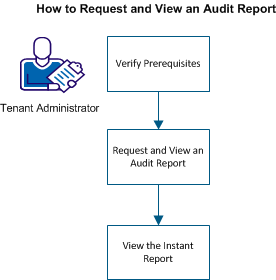
To run the snapshot report, perform the following steps:
- Request and view an audit report.
- Depending on the time taken for the report to generate, do one of the following steps:
Copyright © 2013 CA.
All rights reserved.
|
|