

Snapshot reports enable you to see the current state of a Identity Management environment. You can use this information to ensure compliance with internal business policies or external regulations.
You can generate snapshot reports from management data which describes the relationship between objects in Identity Management environment. Examples of management data include the following:
A snapshot report include data from the Snapshot Database, which contains information from the Identity Management object store and the user store. Depending upon the report type, your request to view a report is taken immediately or is sent for approval to the CSP administrator.
The following is a list of default snapshot reports available in Identity Management:
The following graphic illustrates the process to request and view a snapshot report:
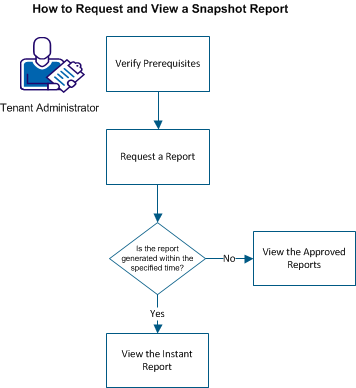
To run the snapshot report, perform the following steps:
|
Copyright © 2013 CA.
All rights reserved.
|
|