

Administration Guide › Users › Adding Users to CA CloudMinder › Directory Synchronization for On-Premise Monitoring
Directory Synchronization for On-Premise Monitoring
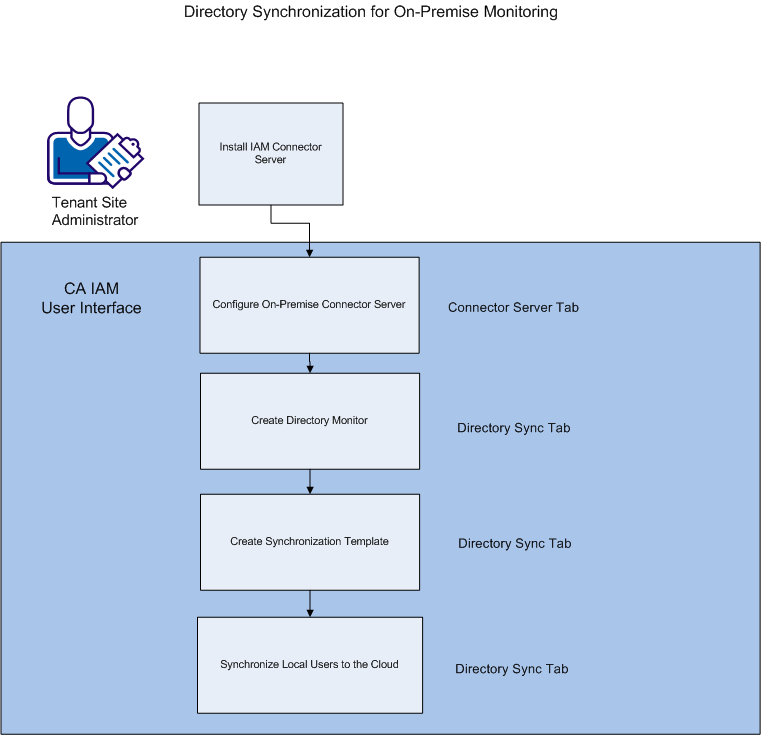
As a tenant Site Administrator who wishes to use directory synchronization to populate a cloud-based environment with on-premise user details, follow this process:
- Receive the username, password, URL, and tenant name for the cloud-based CA IAM Connector Server from the CA CloudMinder System Administrator for your environment. This information allows you to connect your local CA IAM Connector Server to the cloud for synchronization.
- Download and install CA IAM Connector Server in your on-premise environment. The installation package is available from support.ca.com.
- Configure an on-premise Connector Server to connect to the preconfigured cloud-based CA IAM Connector Server.
- Create a directory monitor. Monitors capture changes that you make locally, and report them for synchronization.
- Create a Synchronization template to locate on-premise users.
- Synchronize users from your local store to the cloud. When you finish this step, CA IAM Connector Server automatically syncs any future changes in your ADS users with the cloud store.
Copyright © 2013 CA.
All rights reserved.
|
|