

Identity Management Service › Connectors Guide › Connecting to Endpoints › IBM RACF v2 Connector › RACF v2 Connector
RACF v2 Connector
RACF v2 is a Java connector that is installed with the CA IAM Connector Server. This chapter describes how to connect to a RACF v2 connector. You can use the RACF v2 connector to allow the following products to connect to a RACF endpoint:
- Identity Management
- CA CloudMinder
In Identity Management, if you are replacing the RACF connector with the RACF v2 connector, use the migration tool to migrate account templates and their associations to objects in the RACF v2 connector. For more information, see Appendix A: How to Migrate Data from the Plug-in Connector section in this guide.
The following diagram shows the tasks that are required to connect to the endpoint, and who does each task.
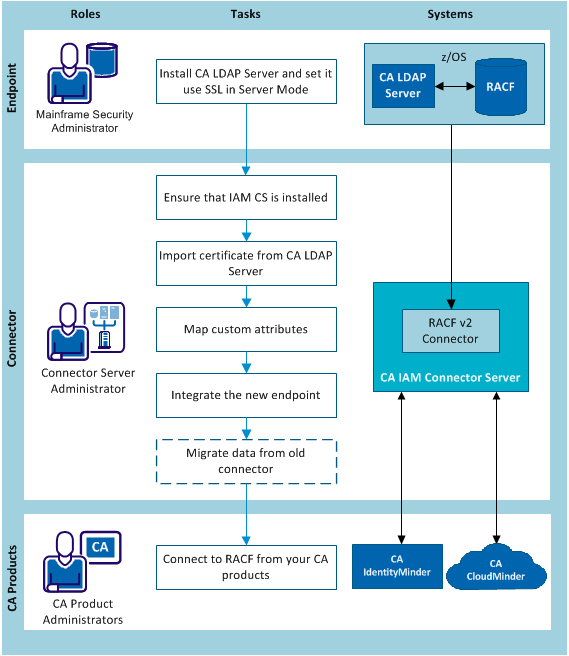
- A mainframe security administrator installs CA LDAP Server on the mainframe, then sets it to use SSL in Server Mode.
- The connector server administrator does the following steps:
- (If necessary) Install CA IAM Connector Server. For details, search for Install CA IAM CS in the Identity Management bookshelf.
- (If necessary) Import the CA LDAP Server certificate into the CA IAM Connector Server keystore.
- (If necessary) Map custom attributes.
- Integrate the managed endpoints in Identity Management.
- For CA CloudMinder, configure the cloud-based CA IAM Connector Server for setting up CA IAM Connector Server on the cloud.
- If necessary, the Identity Management administrator migrates data from a RACF endpoint that used the old plug-in connector. This is described in How to Migrate Data.
- The CA product administrators connect to the endpoint in Identity Management or CA CloudMinder.
Copyright © 2013 CA.
All rights reserved.
|
|