

The Unicenter Registration Services shows the CA NSM deployment and its health and availability status. This service lets any component (or product) register itself, create objects representing its desired hierarchy, and update them with health status. These tasks are accomplished without installing a WorldView component or having knowledge of a WorldView component on the registering device; only an active DIA is required.
The first WorldView Manager/MDB that is installed in a particular DIA zone is designated as the Unicenter Registration Service Server. You can change the server that is registered with DIA by using the switchwvregsrvr utility. For more information about the switchwvregsrvr utility, see the online CA Reference.
Using the Unicenter Registration Services, all CA NSM state objects are created in one MDB that has been designated as the Unicenter Registration Services server. This configuration provides a complete holistic view of the CA NSM deployment and its status. You see the whole deployment of CA NSM in one repository.
Note: When this mode is enabled, you may not see your Enterprise Management objects in the local repositories if the Unicenter Registration Services server is pointing to another MDB. If you have custom processing needs that are dependent on previous product architecture, you can revert to using WorldView daemon processing and the Unispace folder. For more information, contact Technical Support.
Using this functionality, the device where the component resides is discovered as well as the component. The Unicenter Registration Service Server contains a Business Process View under ManagedObjectRoot called Deployed Objects, which contains the state of all CA NSM components that are installed in the same DIA zone. After the component is registered in WorldView, you can use all of the WorldView functionality to view and manage the component, such as defining status propagation rules and find algorithms, and accessing the component using the Management Command Center, WorldView Classic GUI, and the Unicenter Browser Interface.
When you install a CA NSM component, the component is "registered" in the MDB on the Unicenter Registration Service Server, and a proxy object is created, which represents the component. Each component sets the state of its proxy object and this state is recorded in the MDB. Components that create proxy objects are WorldView, Enterprise Management, and Agent Technology. Agent Technology groups the DSM object into a Business Process View called Domain, which also appears directly under ManagedObjectRoot.
Possible states for each component include the following:
You may want to use alarmsets to map the specific status text to a severity. The status texts are product-specific and help you diagnose the problem with a particular proxy object.
In addition to the state, other properties that are important to the health of the component are recorded in the MDB. When the state of an object changes, the change is reported to the MDB, and any properties that may have changed are also reported.
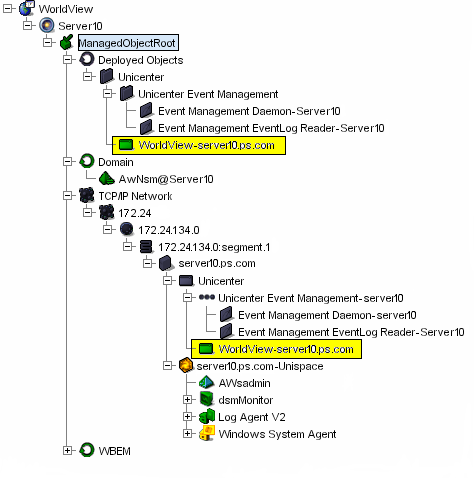
The following picture shows the Topology View for a computer called Server10, which is the designated Unicenter Registration Services server. Server10 also has WorldView installed on it. The Unicenter object is created under Server10 in the TCP/IP network. The proxy object, called, WorldView-server10.ps.cpm, is created as a child object of the Unicenter object. The Deployed Objects Business Process View mirrors this topology. Any status changes to the WorldView object will be reflected in both places.
Business Process View Management (BPVM) is a component of CA NSM that lets you use Business Process objects to monitor and control your network. You can use Business Process objects to apply new rules to your system to determine how state is propagated from existing WorldView objects using methods that include simple counters and complex correlation rules. BPVM lets you implement policies to make automated high-level decisions about key resources and set warning and critical events when problems are detected.
For example, you may have a Business Process View™ that includes three web servers. Failure of one web server may be significant, but it may not have an adverse impact on your business operations. Failure of two web servers may have a major business impact, possibly bringing operations to a halt if the two servers remain offline for an extended time period. Using BPVM, you can define a rule that represents one server's failure as a warning state, and two servers' failure as a critical state requiring immediate action.
|
Copyright © 2010 CA.
All rights reserved.
|
|