

You can print the current view of the jobflow (that is, the contents of the active Jobflow Forecast window), or you can print the entire jobflow forecast. You can customize your output by specifying fonts, colors, titles, legends, and other elements.
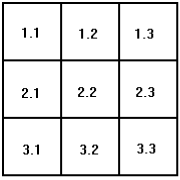
The typical jobflow forecast spans multiple pages, both horizontally and vertically, and the output must be assembled. Jobflow generates a two‑part number on each page of the printed output indicating the location of a particular segment on the assembled, printed flowchart. The digits preceding the decimal indicate the horizontal position (the row) of the segment; the digits following the decimal indicate the vertical position (the column) of the segment. The following diagram illustrates the numbering convention:
The sections in the remainder of this chapter provide more detail about the following topics:
|
Copyright © 2010 CA.
All rights reserved.
|
|