

CA Catalyst connectors expose product data to consuming products such as CA Spectrum Service Assurance and CA IT Process Automation Manager for visualization, analysis, and management in a unique, heterogeneous context.
Note: You can install the Client Automation connector with an existing domain manager or scalability server only on Windows operating systems.
Client Automation connector supports SSA 3.2.0. The Client Automation connector interfaces with the DSM domain manager or a standalone scalability server registered with a domain manager to expose Client Automation data for use by products that leverage the CA Catalyst infrastructure. Integrating Client Automation data with consuming products, such as CA Spectrum SA, enables reconciliation and correlation of entity properties with existing configuration items (CIs). Integration also lets you evaluate the data in a different, broader business service context.
Note: CA ITCM connector 3.2.0 supports only the Northbound on SOI 3.2.0.
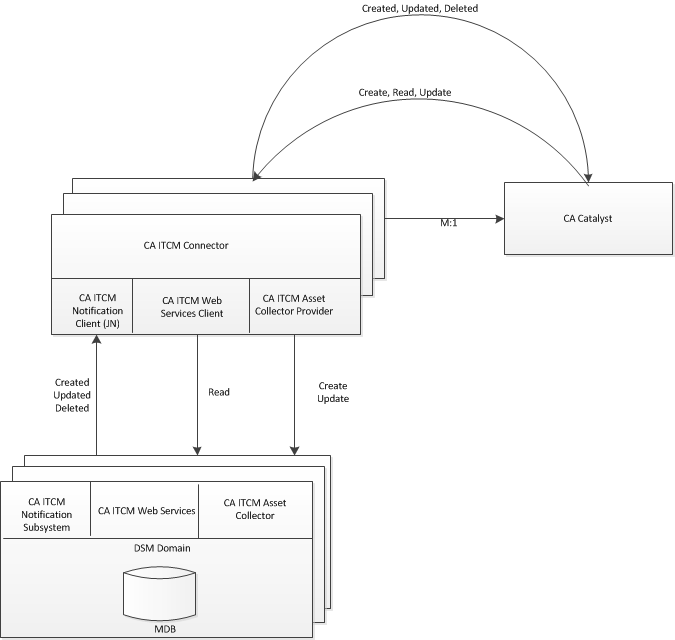
With CA Catalyst connector integration, there is one Client Automation connector per domain. The Client Automation connector interfaces with the domain manager using the following Client Automation components or functionality:
Client Automation Web Services is used to retrieve information about the CIs to be published to CA Catalyst connector.
Events about updates to published CIs are received through the Client Automation event notification subsystem.
The Asset Collector component is used during CA Spectrum SA subscribe operations for Computer CI data. The Asset Collector files help to move the inbound create data and update data from the connector to the Client Automation MDB.
The following graphic summarizes Client Automation - CA Catalyst connector integration:
Note: For more general information about the CA Catalyst infrastructure and its connectors, information that applies to all connectors, and information about custom connector integrations, see the Connector Guide distributed with CA Spectrum SA. For complete information about installing, configuring, and using the Client Automation connector, see the CA IT Client Manager Connector Guide also distributed with CA Spectrum SA.
|
Copyright © 2014 CA Technologies.
All rights reserved.
|
|