

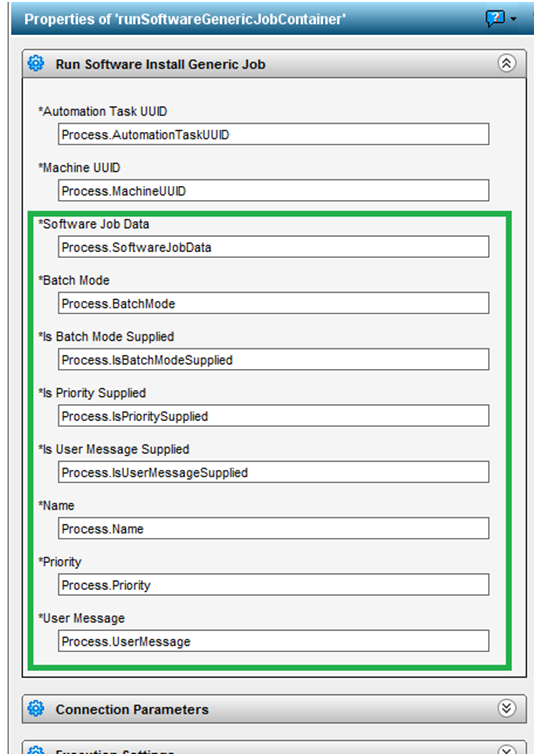
You must configure the Run Software Install Generic Job operator in CA Process Automation to add parameter definitions that Client Automation requires to run software jobs.
To configure generic software job operator
Specifies whether you want to execute the jobs in batch node. If set to false, the jobs will execute in No Linkage mode.
Data Type: Boolean
Possible Values: true, false
Specifies true or false depending on whether the BatchMode parameter is supplied.
Data Type: Boolean
Possible Values: true, false
Specifies true or false depending on whether the Priority parameter is supplied.
Data Type: Boolean
Possible Values: true, false
Specifies the name of the software job container.
Data Type: String
Possible Values: Any valid string
Specifies the priority that can range from 1 (highest) to 10 (lowest), If no value is provided, the default value, 5, is used.
Data Type: Integer
Possible Values: 1 to 10
Specifies the custom administrator message.
Data Type: String
Possible Values: Any valid string
Data Type: String
Possible Values: XML string with software job data
Note: Copy and paste the contents of the XML file you created with the software job data definitions.
Data Type: Boolean
Possible Values: true, false
Stores a generic Job ID that the automation process returns after executing the job.
Data Type: String
Possible Values: Generic software job ID
The Properties dialog for Run Software Install Generic Job is displayed.
Process.genericJobID = Process[OpName].swJobID;
The Run Software Install Generic Job operator is configured with the parameters required for running generic software jobs.
|
Copyright © 2014 CA Technologies.
All rights reserved.
|
|