

Following are the key attributes for collecting the signature data of installed software.
Registry data can be collected from any of the registry hives but HKLM\Software usually is used in most cases. For example:
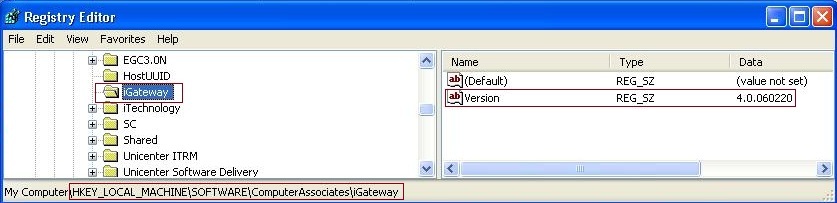
Note: You can find all the Add/Remove Program entries in one of the following registry locations:
HKEY_LOCAL_MACHINE\SOFTWARE\Microsoft\Windows\CurrentVersion\Uninstall
HKEY_LOCAL_MACHINE\SOFTWARE\Wow6432Node\Microsoft\Windows\CurrentVersion\Uninstall
HKEY_LOCAL_MACHINE\SOFTWARE\Wow6432Node\Microsoft\Windows\CurrentVersion\Uninstall\VLC media player
The signature of VLC Media Player 2.1.3 contains the registry identifier as follows: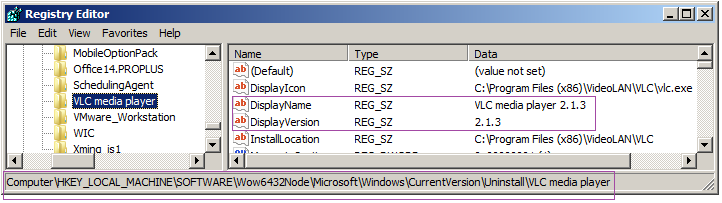
Uniquely identifies the software files that are dropped by the installation with the following attributes:
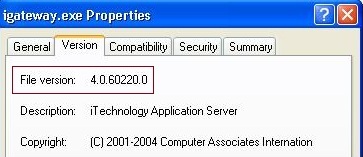
As shown in the properties window of the .exe file. For example,
<file name="igateway.exe" path ="*" minversion="4.0.60220.0" maxversion="4.0.60220.0"/>
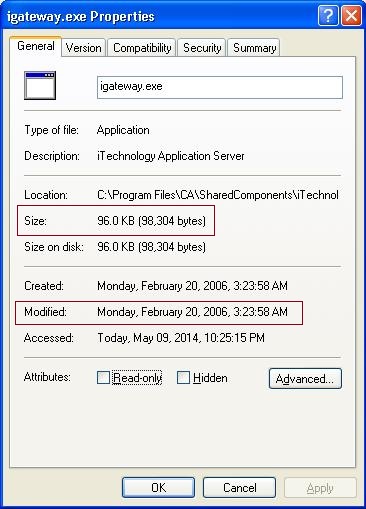
As shown under Modified in properties window of the .exe file.
As shown in the properties window of the .exe file. For example,
<file name="igateway.exe" path ="*" minfilesize="98304" maxfilesize="98304" minmodified="2006-02-20T00:00:00Z" maxmodified="2006-02-20T23:59:59Z"/>
Contains the version information that the Parser can be read. The parser reads the contents of the file looking for the data provided in the match criteria. For example, <file name="igateway.conf" path="*" match="4.0.060220" />
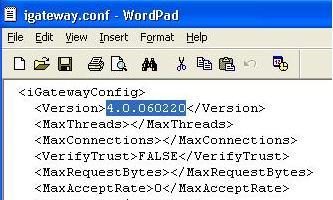
Note: Creating signatures using configuration files is more useful to create Unix signatures where you do not have file version and registry.
The HKLM\SOFTWARE\Wow6432Node key is used by 32-bit applications on a 64-bit Windows OS, and is equivalent but separate to "HKLM\SOFTWARE". Typically 64 bit binary files register themselves to HKLM\SOFTWARE whereas 32 bit binary files write their information under HKLM\SOFTWARE\Wow6432Node. Similarly, 32-bit applications see %SystemRoot%\Syswow64 as %SystemRoot%\System32. There are two Program Files directories, both visible to both 32-bit and 64-bit applications. The directory that stores the 32 bit files is called Program Files (x86) to differentiate between the two, while the 64 bit maintains the traditional Program Files name without any additional qualifier.
Important! By default the CA Client Automation agent treats the registry/file path as 32 bit in the absence of the arch="64" tag. Note that the arch="64" tag applies to the registry and file name tags only. So take care to use the appropriate registry keys depending on the architecture of application.
Example: <registry name="HKEY_LOCAL_MACHINE\SOFTWARE\JavaSoft\Java Runtime Environment\1.6.0" arch="64" /> Or <file name="bin\java.exe" match="1.6.0-b105" path="*" arch="64" />
Groups multiple registry key values and file attributes. You can group more than one data item/tag to confirm the presence of the required installed software, using the following logical conditions with the group Tag:
Evaluates all the items and groups under the AND group to TRUE.
Example:
<group type=”and”>
<registry name="HKEY_LOCAL_MACHINE\SOFTWARE\Microsoft\Windows\CurrentVersion\Uninstall\Mozilla Firefox (2.0.0.3)"/>
<file name="firefox.exe" minversion="1.8.20070.30919" maxversion="1.8.20070.30919" path="*"/>
</group>
Evaluates at least one of the items or groups under the OR Group to TRUE
Example:
<group type="or">
<group type="and">
<file name="sw3eng.exe" path="*" minversion="3.0.1.73"/>
<file name="EngineApplet.exe" path="*" minversion="3.0.1.73"/>
</group>
<group type="and">
<file name="LGClient.exe" path="*" minversion="3.0.1.73"/>
<file name="LGWorkspace.exe" path="*" minversion="3.01.73"/>
</group>
</group>
Evaluates the group to FALSE if the item or group underneath evaluates to TRUE.
Example:
<group type="and" >
<sysinfo osname="AIX" />
<file name="LDS-em-client.jar" minfilesize="183308" maxfilesize="183308" path="*" />
<group type="not" >
<file name="LDS-descriptions.jar" path="*" />
</group>
</group>
|
Copyright © 2014 CA Technologies.
All rights reserved.
|
|