

Der Abschnitt "hardware" enthält die Einträge für das allgemeine und zusätzliche Inventar. Der Abschnitt "GeneralInventory" (allgemeines Inventar) kann nur die Inventargruppen und Attribute aufzeigen, die von Client Automation-Agenten erfasst werden. Wenn Sie benutzerdefinierte Gruppen und Attribute hinzufügen möchten, müssen Sie diese außerhalb des Gruppentags "GeneralInventory" erstellen. Die benutzerdefinierten Gruppen und Attribute werden im DSM-Explorer unter "Inventar", Ordner "Sonstiges" angezeigt.
Der Abschnitt "hardware" verfügt über die folgenden Tags:
Definiert den Gruppennamen, unter dem die Inventarelemente erstellt werden.
Definiert den Namen, Typ und Subtyp des Inventarelements.
Beispiel: Abschnitt "hardware" (Attribut und Wert)
Hier sehen Sie ein Beispiel für den Abschnitt "hardware":
<hardware>
<group name="GeneralInventory">
<group name="System">
<attribute name="Total Memory" type="int64" subtype="byte">2147483648</attribute>
<attribute name="Model" type="string">OptiPlex GX270</attribute>
<attribute name="Type" type="string">Desktop</attribute>
<attribute name="No of Processors" type="int32" subtype="normal">1</attribute>
<attribute name="No of COM ports" type="int32" subtype="normal">2</attribute>
<attribute name="No of Printer ports" type="int32" subtype="normal">1</attribute>
<attribute name="No of USB ports" type="int32" subtype="normal">2</attribute>
<attribute name="No of Video ports" type="int32" subtype="normal">1</attribute>
<attribute name="Vendor" type="string">Dell Computer Corporation</attribute>
<attribute name="Serial Number" type="string">50ZQ21J</attribute>
<attribute name="Asset Tag" type="string">N/A</attribute>
<attribute name="System ID" type="string">44454C4C-3000-105A-8051-B5C04F32314A</attribute>
</group>
</group>
</hardware>
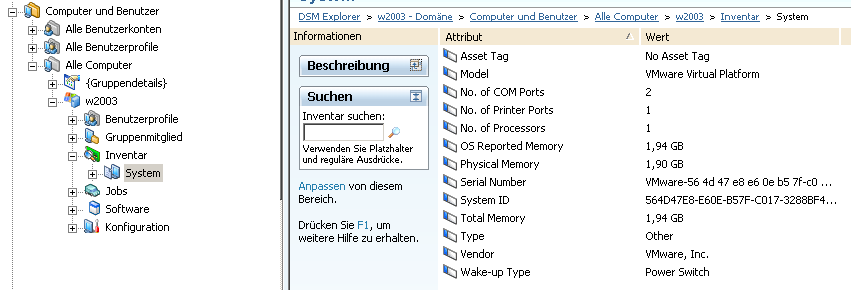
Die folgende Abbildung zeigt die GUI-Ergebnisse des obigen Codes.
Beispiel: Hardware-Inventardatei (Tabellenformat)
Der folgende Code enthält ein Beispiel für eine Hardware-Inventardatei.
<hardware>
<group name="GeneralInventory">
<group name="FileSystem">
<group name="LocalFileSystem" tableid="0001">
<attribute name="Device" type="string">\Gerät\FestplatteVolume1</attribute>
<attribute name="FileSystem" type="string">FAT32</attribute>
<attribute name="Free" type="int64" subtype="G">2230124544</attribute>
<attribute name="Mount Point" type="string">C:\</attribute>
<attribute name="Name" type="string">C:\</attribute>
<attribute name="Serial Number" type="string">5872-D416</attribute>
<attribute name="Size" type="int64" subtype="G">3784294400</attribute>
<attribute name="Type" type="string">Fest</attribute>
<attribute name="Used" type="int64" subtype="G">1554169856</attribute>
<attribute name="Used %" type="int32">20</attribute>
<attribute name="Volume Label" type="string">C</attribute>
</group>
<group name="LocalFileSystem" tableid="0002">
<attribute name="Device" type="string">\Gerät\FestplatteVolume2</attribute>
<attribute name="FileSystem" type="string">FAT32</attribute>
<attribute name="Free" type="int64" subtype="G">2230124544</attribute>
<attribute name="Mount Point" type="string">D:\</attribute>
<attribute name="Name" type="string">D:\</attribute>
<attribute name="Serial Number" type="string">5872-D423</attribute>
<attribute name="Size" type="int64" subtype="G">43784794400</attribute>
<attribute name="Type" type="string">Fest</attribute>
<attribute name="Used" type="int64" subtype="G">41554269856</attribute>
<attribute name="Used %" type="int32">89</attribute>
<attribute name="Volume Label" type="string">D</attribute>
</group>
</group>
</group>
</hardware>
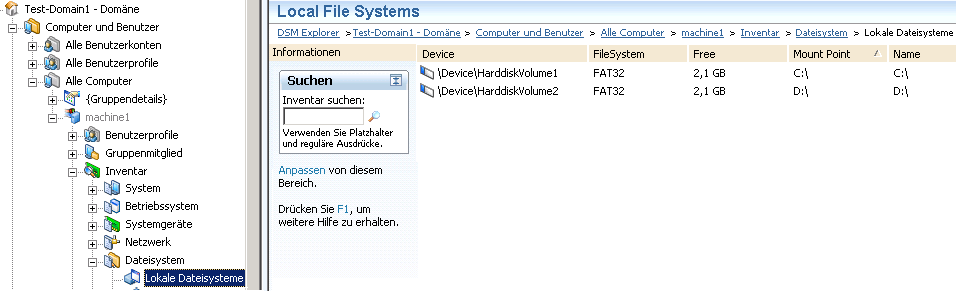
Die folgende Abbildung zeigt die GUI-Ergebnisse des obigen Codes.
|
Copyright © 2014 CA Technologies.
Alle Rechte vorbehalten.
|
|