

Setting up Interactive Portlets › Add a Web Connection Definition
Add a Web Connection Definition
Create a connection definition in Xcelsius using the Data Manager. The approach to connecting real-time data from CA Clarity PPM to an Xcelsius visualization can vary depending on the following:
- Your level of experience with Xcelsius and Microsoft Excel spreadsheets (basic as opposed to advanced)
- Connection choices you make, such as dynamically connecting to multiple Web Service URLs or displaying a visualization in another language
- The complexity of the visualization you are designing in Xcelsius
To allow real-time CA Clarity PPM data transfers, you must bind elements to cells in the embedded Excel spreadsheet of a visualization. The series of steps enable the components of the visualization to retrieve data from the cells to which they are bound. The external data connection must be configured to insert data into the embedded spreadsheet. Components that use the data from the external source are then bound to the cells updated by the external connection.
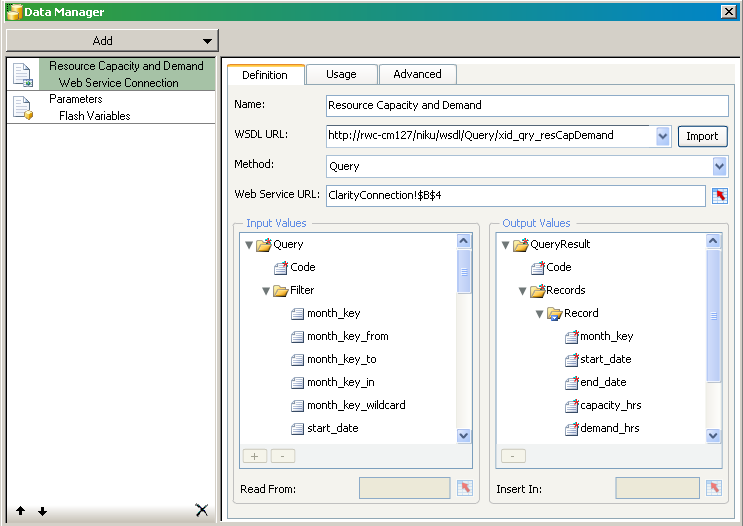
This illustration shows the Data Manager with a basic external data connection setup:
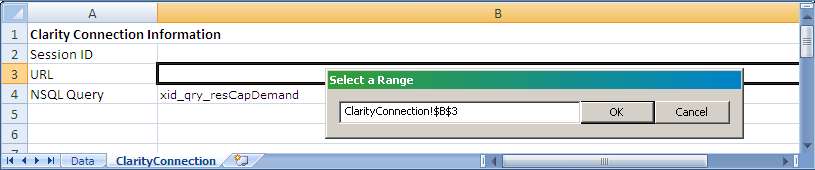
This illustration shows the corresponding, embedded spreadsheet for the web service connection:
Create an external data connection for each query associated with the visualization. In addition, create one for the Flash variables that map to the global and object parameters.
- Query external data connection. Enables you to link data connection and query elements to cells in the embedded spreadsheet. For example, you might link the following to spreadsheet cells: the WSDL URL, connection method, web service URL, and each query data element.
- Flash Variable external data connection. Enables you to create named Flash variables used in global and object parameters of an interactive portlet, such as the required global parameter, session ID.
For complete information about how to set up a data connection definition, see the following:
- SAP BusinessObjects Xcelsius 2008 User Guide.
- Example: Interactive Portlet Using Web Services Connection.
- The sample file Resource Dashboard.xlf. This file is provided as part of the Design Files for Xcelsius Visualizations download available from CA Clarity PPM. You can open the file in Xcelsius to view the Data Manager and the embedded Excel spreadsheet.
Copyright © 2015 CA Technologies.
All rights reserved.
|
|