

Using portfolio management, you can create and review a collection of investments that interest stakeholders in your business. Once you create a portfolio, the system creates a snapshot of your investment data that is used for management and reporting purposes. You can set up a cadence for updating the data in this snapshot to match your latest investment information. Thereafter, you can create alternate versions or plans using the data. To explore alternatives for your investments, use these plans to create and compare what-if scenarios.
A portfolio is a collection of investments. Depending on your needs, you can create the following types of portfolios that are based on the following:
Example: IT Portfolio for Current Projects
Max, the PMO Director at Forward, Inc,. wants to create a portfolio of all the projects that the organization currently supports. A target amount of budget and resources exist that Max can use for the projects. With all of the projects in the portfolio, Max uses Portfolio Management to accomplish the following business goals:
The following diagram describes how a system administrator and a portfolio manager get started with portfolio management.
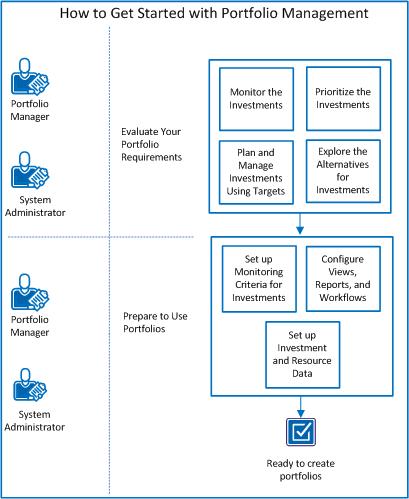
To get started with portfolio management, perform these steps:
|
Copyright © 2015 CA Technologies.
All rights reserved.
|
|