

Advanced Reporting allows you to create an ad hoc view of CA Clarity PPM data that you can save as a report and share using different formats. You configure each ad hoc view and its corresponding report by selecting the data that you want to include. You can run a report immediately or you can set up a schedule. In either case, you control the output method and format.
The following diagram shows the Advanced Reporting components:
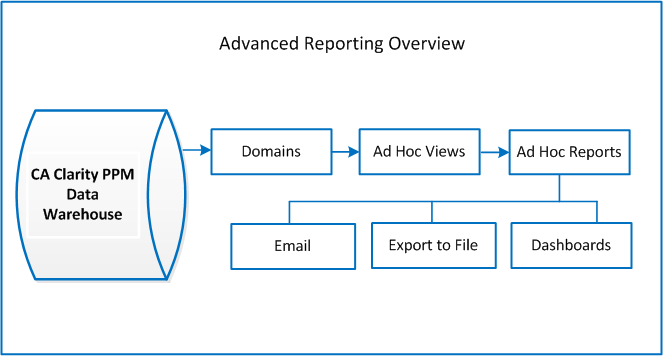
The CA Clarity PPM Data Warehouse is the main data source for Advanced Reporting. The Data Warehouse schema is optimized specifically for reporting. The schema includes the Investment, Resource, Portfolio, Timesheet, and Project data. The Data Warehouse is populated at scheduled intervals by jobs that load the relevant data from the CA Clarity PPM database to the Data Warehouse. The Data Warehouse can be extended to include custom objects and attributes.
CA Clarity PPM provides a set of domains that contain the most frequently used data. When you create an ad hoc view, you select from a list of the available domains. A domain provides a business view of the CA Clarity PPM Data Warehouse. A domain limits your access to data based on your security permissions. For example, if a user is permitted to access specific projects and resources in CA Clarity PPM, that user can access the same projects and resources in the Advanced Reporting domains. If you add custom objects or attributes to the product, these custom objects and attributes can also be included in the domains.
Note: To view the domains and reports, you must have the PMO Accelerator add-in with Jaspersoft Advanced Reporting content. See the PMO Accelerator for Jaspersoft Advanced Reporting Product Guide or your administrator for more information.
You create ad hoc views in the form of charts, tables, and cross tabs that let you analyze data from the domains. You can also use the ad hoc views to generate reports, which you can share or output in the following ways:
Note: Advanced Reporting uses the JasperReports Server (which is integrated with CA Clarity PPM) to manage ad hoc views and reports. For information about the JasperReports Server, see the Jaspersoft Community web site. See the CA Clarity PPM Release Notes for the Jaspersoft version that corresponds to your CA Clarity PPM release.
|
Copyright © 2015 CA Technologies.
All rights reserved.
|
|