

How to Set Up Financial Management › How to Set Up a Financial Entity
How to Set Up a Financial Entity
To enable and use financial management, first set up an entity to define the internal financial framework of your organization. Setting up the entity provides the following benefits:
- A standardized financial planning process for all investments.
- Visibility to how investment costs are tracked.
Example: Setting up an Entity for Financial Planning
The financial manager at an IT corporation sets up a financial entity to provide the investment managers the basic framework for building detailed financial plans.
The financial manager defines the following financial classes to categorize the organizational information to process financially:
- Resource classes to differentiate the offshore and local resources.
- Transaction classes to categorize consulting, development, and sales labor transaction types.
To allow cost planning that is based on monthly periods, the financial manager selects a monthly fiscal time period type spanning from January 1 to December 31.
The financial manager then selects the following grouping attributes to drive the structure of all investment cost plan line items:
- Resource
- Role
- Transaction Class
The following diagram describes how the financial manager sets up a financial entity:
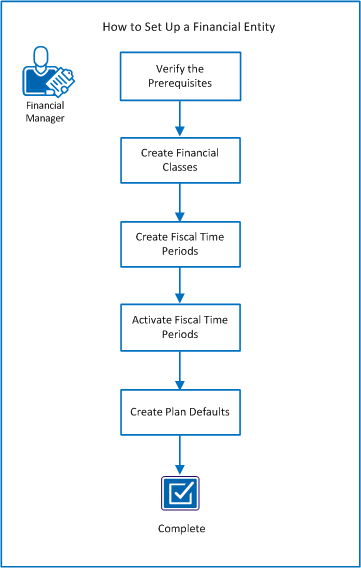
Follow these steps:
- Verify the prerequisites.
- Create financial classes.
- Create fiscal time periods.
- Activate fiscal time periods.
- Create plan defaults.
Verify the Prerequisites
Before you set up a financial entity, complete these prerequisites:
- Understand
-
Verify that you understand the following financial management concepts:
- Cost planning versus actuals, fiscal calendar cycles, fiscal time periods and how they are defined in your organization.
- The desired outcomes for any type of configuration. After you start using the configured data to create instance data, you cannot change the configuration. For example, you cannot delete fiscal time periods, department or location OBS units, or financial classifications that the application is using.
- How you want to set up your organizational structure using entity, and the location and department organizational breakdown structure (OBS) units. Organization is important because when you use the application or you generate reports, information groups by the outcome desired.
- How your configurations, classifications, and definitions affect the data flow to your third-party integrations and chargebacks processing.
- Create the OBS and Entity
-
Verify that you have created the following setup:
- A multi-currency setup with an activate system currency.
- A financial location and financial department OBS.
- An entity associated with the financial location and financial department OBS.
- Department and location OBS units for the entity that are associated with each other.
- Grouping Attributes
-
Determine the criteria to group your financial planning data. Establish grouping attributes for cost plan line item details.
Example: Grouping Attributes
- Cost Type. Includes separate line items for operating and capital costs.
- Charge Code. Includes different types of operating or capital costs such as fixed or variable operating costs.
Copyright © 2014 CA.
All rights reserved.
|
|