

As the financial manager, you can ensure that standard costs and rates apply to all detailed financial plans and transactions for investments. Create a standard cost/rate matrix that provides default values from a centralized cost/rate matrix in the financial system. The standardized default information eliminates the need for defining costs and rates for different financial plans and transactions individually.
Populate the cost/rate matrix with the following types of financial values:
Example: Set up a Cost/Rate Matrix that is Based on Resource Class
The Document Management Company captures costs in the financial system using the resource class and the input type code of the resources that are assigned to their investments. The company has four different resource classes that are assigned to two different input type codes. The resource classes and input type codes have different costs that are associated with them. For example, a billable labor has an actual cost of $100 whereas a non-billable labor has no cost that is associated with it. Also, cost for non-labor resource classes is calculated as $1 x quantity.
To meet the corporate requirements, Sam the financial manager at Document Management Company sets up a cost/rate matrix with five different rows. Sam creates one row for each resource class (labor and non-labor) and input type code combination and populates the row with the appropriate cost. The matrix rows define the criteria for applying costs to resources for transaction processing. The following table shows the matrix rows:
|
From Date |
To Date |
Resource Class |
Input Type Code |
Actual Cost |
|---|---|---|---|---|
|
1/1/14 |
12/31/14 |
Labor |
Billable |
$100 |
|
1/1/14 |
12/31/14 |
Labor |
Non-Billable |
$0.00 |
|
1/1/14 |
12/31/14 |
Expense |
* |
$1.00 |
|
1/1/14 |
12/31/14 |
Materials |
* |
$1.00 |
|
1/1/14 |
12/31/14 |
Equipment |
* |
$1.00 |
The following diagram describes how the financial manager sets up a cost/rate matrix:
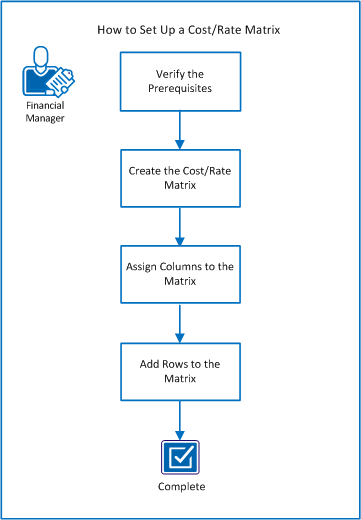
Follow these steps:
Before you set up a cost/rate matrix, complete these prerequisites:
Verify that you understand the following financial management concepts:
Verify that you have created and set up a financial entity as described in the How to Set Up a Financial Entity scenario.
Verify that you have the gathered the following information that is required to plan for your matrix:
|
Copyright © 2014 CA.
All rights reserved.
|
|