

You can use the UI theme CSS to customize the appearance of the login page. For example, set a custom logo for an organization or set a message for all users to view when they log in. A sample system maintenance message appears as follows:
The system will be unavailable from Sun April 15 at 11:30 pm until Mon April 16 at 3:30 am.
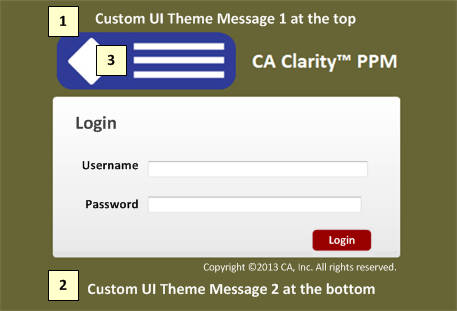
1. Login Page Top Message
You can add a service announcement or custom message at the top of the login page.
2. Login Page Bottom Message
You can add a service announcement or custom message at the bottom of the login page.
3. Login Page Logo
You can insert a custom logo on the login page.
Note: See the Studio Developer Guide for more information.
Upgrade Action: None
Starting with Release 13.3, the bubbles in a bubble chart are translucent. This change allows smaller bubbles that appear behind larger bubbles to be viewed. Previously, smaller bubbles were not visible when hidden because the bubbles appeared as solid objects in the chart.
Upgrade Action: None
A drop-down list that exceeds 20 values for a field changes from a drop-down list to a browse lookup. The browse lookup is easier to use when the list of values is long.
Upgrade Action: None
Before this release, an export to Excel or PowerPoint exported portlet information for all tabs for a selected page. With Release 13.3, only information that is on the selected tab is exported. Exporting the portlet information for a tab is the default behavior.
This behavior is governed by the system-level option ENABLE_PAGE_LEVEL_EXPORT. The value of this option is false by default, which means the information from the current active tab is exported. If the value of this flag is set to true, information from the portlets of all page tabs are exported.
Upgrade Action: To put the new value into effect, flush the server cache.
To check the value of this option, use the following SQL:
SELECT cov.value FROM cmn_option_values cov, cmn_options cos
WHERE cos.option_code = ‘ENABLE_PAGE_LEVEL_EXPORT’ AND cov.id = cos.id
The Y-Axis unit of measure for the Major Unit Increment field is days when the Y-Axis for a chart represents date data.
|
Copyright © 2014 CA.
All rights reserved.
|
|