

A loading pattern defines how work is spread across the duration of a task. The loading pattern for a resource defines how resource assignments are used to complete tasks when you recalculate the task duration and you autoschedule your project. You have the following patterns available to help replicate how team members work on tasks.
You can assign resources to tasks using any of the following loading patterns: Uniform, Contour, Fixed, Front, or Back. Use these loading patterns with autoschedule to produce a workable schedule automatically that allows for real-time variations in the way work is assigned and completed.
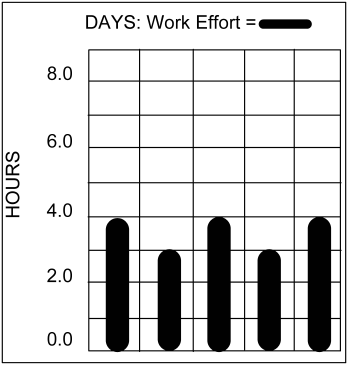
The Uniform loading pattern assigns resource time evenly across a task only on those days when the resource is available to meet the task requirements. For example, if a resource is scheduled to work four hours per day on a task, the resource will not be scheduled to work on that task on days when the resource is only available to work on the task for three hours. The maximum percentage and resource availability is taken into account when assigning resources to tasks using this loading pattern.
Note: To use this loading pattern, set the maximum percentage of the resource on the task.
Graphically, this loading pattern can look as follows:
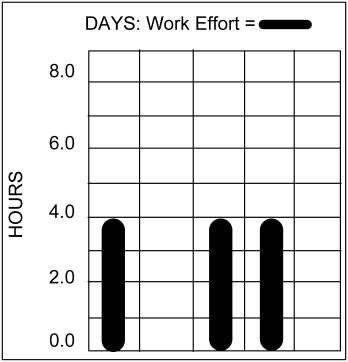
Front Loading Pattern
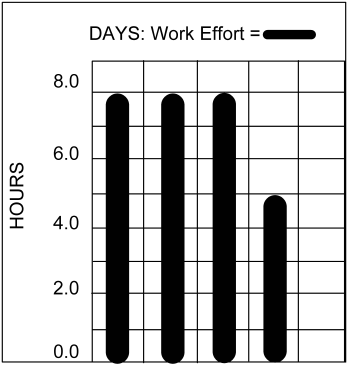
The Front loading pattern allocates resource usage as early in the task as possible. Resources are assigned to get work done as early as their availability permits. The maximum percentage of the resource on a task and the resource availability are taken into account when using this loading pattern.
Note: To use this loading pattern, set the maximum percentage of the resource on the task.
Graphically, this loading pattern can look like as follows:
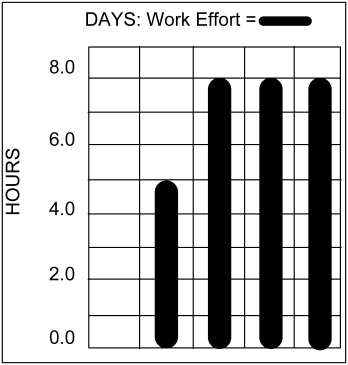
The Back loading pattern allocates resource usage as late as possible in the task. Resources are assigned to get work done as late as their availability permits. The Max % and resource availability is taken into account when assigning resources to tasks using this loading pattern.
Note: To use this loading pattern, set the maximum percentage of the resource on the task.
Graphically, this loading pattern can look as follows:
This Fixed loading pattern allocates resource usage to tasks according to your needs. Open Workbench automatically locks fixed resource assignments so that they are not changed when you autoschedule or when you recalculate task duration.
When you use this loading pattern, you can create a discontinuous task, or one that starts and stops, and then starts again. You can display the pattern in views where ETC is tabulated.
Graphically, this loading pattern can look as follows:
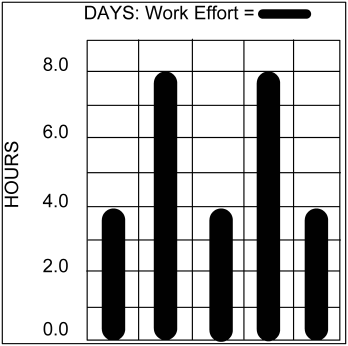
The Contour loading pattern fits resource loading around the remaining availability of the resource, smoothing out the peaks and valleys. This pattern is flexible and can appear as the reverse or mirror image of overlapping task patterns. The changes that you make to the task duration after it is scheduled causes resource assignments for each period to even out across the duration of the task.
This pattern assumes the characteristics of the Uniform loading pattern in the following cases:
Graphically, this loading pattern can look as follows:
|
Copyright © 2014 CA.
All rights reserved.
|
|