

You can use the UI theme CSS to customize the appearance of the login page. For example, set a custom logo for an organization or set a message for all users to view when they log in. A sample system maintenance message appears as follows:
The system will be unavailable from Sun April 15 at 11:30 pm until Mon April 16 at 3:30 am.
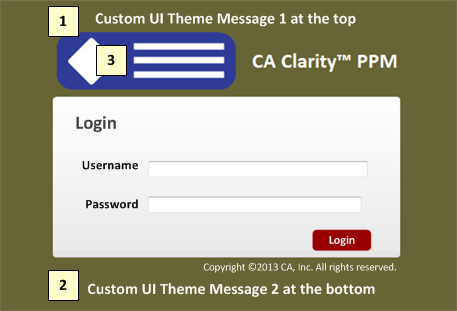
1. Login Page Top Message
You can add a service announcement or custom message at the top of the login page.
2. Login Page Bottom Message
You can add a service announcement or custom message at the bottom of the login page.
3. Login Page Logo
You can insert a custom logo on the login page.
Note: Search the Studio Developer's content for more information.
|
Copyright © 2013 CA.
All rights reserved.
|
|