

|
|
|
The following figure illustrates the model for her visualization:
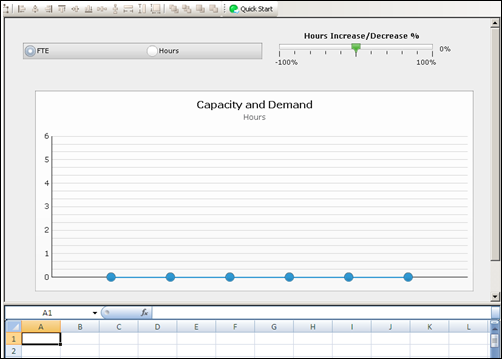
For information about how to map data in Xcelsius, refer to the SAP Xcelsius 2008 User Guide, or see the sample design file Resource Dashboard.xlf.
The following illustration shows an abbreviated version of the xid_qry_resCapDemand query to demonstrate the SELECT statements and the SECURITY clause.
SELECT	@SELECT:DIM:USER_DEF:IMPLIED:TEAM:cal.month_key:month_key@,
	@SELECT:DIM_PROP:USER_DEF:IMPLIED:TEAM:cal.period_start_date:start_date@,
	@SELECT:DIM_PROP:USER_DEF:IMPLIED:TEAM:cal.period_end_date:end_date@,
	@SELECT:DIM_PROP:USER_DEF:IMPLIED:TEAM:
		ROUND(SUM(amts.avail_hrs),0):capacity_hrs@,
	@SELECT:DIM_PROP:USER_DEF:IMPLIED:TEAM:
		ROUND(SUM(amts.alloc_hrs),0):demand_hrs@,
	@SELECT:DIM_PROP:USER_DEF:IMPLIED:TEAM:
		ROUND(SUM(amts.avail_hrs)/stdcal.avail,2):capacity_fte@,
	@SELECT:DIM_PROP:USER_DEF:IMPLIED:TEAM:
		ROUND(SUM(amts.alloc_hrs)/stdcal.avail,2):demand_fte@,
	@SELECT:DIM_PROP:USER_DEF:IMPLIED:TEAM:stdcal.avail:month_hrs@
FROM  SRM_RESOURCES r
INNER JOIN PRJ_RESOURCES prjr ON r.ID = prjr.prid
LEFT OUTER JOIN SRM_RESOURCES rl ON prjr.prprimaryroleid = rl.ID
INNER JOIN NBI_DIM_CALENDAR_TIME cal ON cal.hierarchy_level = 'MONTH'
INNER JOIN ( SELECT full_name, res_id, role_id, SUM(@NVL@(avail_hrs,0)) avail_hrs, SUM(@NVL@(alloc_hrs,0)) alloc_hrs, slice_date
        FROM (
         SELECT r.ID res_id, r.full_name, prjr.prprimaryroleid role_id, SUM(@NVL@(s.slice,0)) avail_hrs, 0 alloc_hrs, s.slice_date
            FROM   SRM_RESOURCES r
            INNER JOIN PRJ_RESOURCES prjr ON r.ID = prjr.prid  AND prjr.prisrole <> 1
            INNER JOIN PRJ_BLB_SLICES_M_AVL s ON r.ID = s.prj_object_id
            WHERE r.is_active = 1
            AND s.slice_date BETWEEN @DBUSER@.XID_DOM_FIRST_FCT(@SYSDATE@) AND @DBUSER@.XID_DOM_LAST_FCT(DATEADD(MM,5,@SYSDATE@))
            GROUP BY r.ID, r.full_name, prjr.prprimaryroleid, s.slice_date
        UNION ALL
            SELECT r.ID res_id, r.full_name, prjr.prprimaryroleid role_id,  0 avail_hrs, SUM(@NVL@(s.slice,0)) alloc_hrs, s.slice_date
            FROM  PRTEAM tm
            INNER JOIN SRM_RESOURCES r ON tm.prresourceid = r.ID
            INNER JOIN PRJ_RESOURCES prjr ON r.ID = prjr.prid
            INNER JOIN PRJ_BLB_SLICES_M_ALC s ON tm.prID = s.prj_object_id
            WHERE r.is_active = 1
            AND s.slice_date BETWEEN @DBUSER@.XID_DOM_FIRST_FCT(@SYSDATE@) AND @DBUSER@.XID_DOM_LAST_FCT(DATEADD(MM,5,@SYSDATE@))
		    GROUP BY r.ID, prjr.prprimaryroleid, r.ID, r.full_name,  tm.prid, s.slice_date
			) A
		GROUP BY full_name, res_id, role_id, slice_date
        )  amts ON r.ID = amts.res_id AND amts.slice_date BETWEEN cal.period_start_date AND cal.period_end_date
LEFT OUTER JOIN (SELECT r.ID res_id, SUM(s.slice) avail, s.slice_date
        FROM SRM_RESOURCES r
        LEFT OUTER JOIN PRJ_BLB_SLICES s ON r.ID = s.prj_object_id
        INNER JOIN PRJ_BLB_SLICEREQUESTS sr ON s.slice_request_id = sr.ID AND sr.request_name = 'MONTHLYRESOURCEAVAILCURVE'
        WHERE r.unique_name = 'xc_admin'
        GROUP BY r.ID, s.slice_date
        ) stdcal on stdcal.slice_date BETWEEN cal.period_start_date AND cal.period_end_date
WHERE @FILTER@
AND @WHERE:SECURITY:RESOURCE:r.id@
GROUP BY  cal.month_key, cal.period_start_date, cal.period_end_date,stdcal.avail
HAVING @HAVING_FILTER@
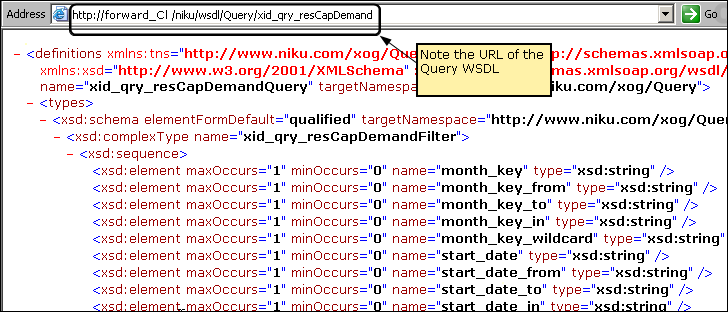
http://<servername:port>/niku/wsdl/Query
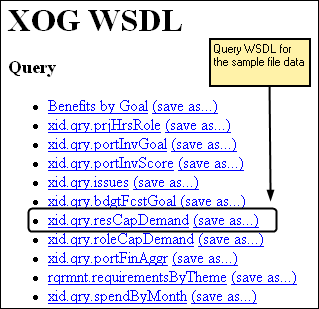
A list of queries appears in XOG WSDL.
The WDSL for the query appears.
Samantha works with the Xcelsius Data Manager next to link the visualization to CA Clarity PPM data.
| Copyright © 2012 CA. All rights reserved. | Tell Technical Publications how we can improve this information |