

|
|
|
An approved cost plan becomes the budget plan for an investment. Because elements of an investment change, you can revise various parts of the budget, or can replace the budget entirely.
You can make two types of revisions to an approved budget plan:
Both revision types provide approval history. However, the replace feature enables you to delete line items that are no longer needed, and to revise grouping attributes and fiscal time periods.
When you submit a cost plan that revises an existing budget, you specify whether to merge or replace using the Submit Options pull-down list. This field appears only when there is at least one approved budget. If the new cost plan has a different structure than the existing budget, Replace is the only option.
When your cost plan is approved, it becomes the revised budget plan with a new version number. You can view the previous version of the budget, which is saved separately. You cannot edit either previous budget plans or the current approved budget plans.
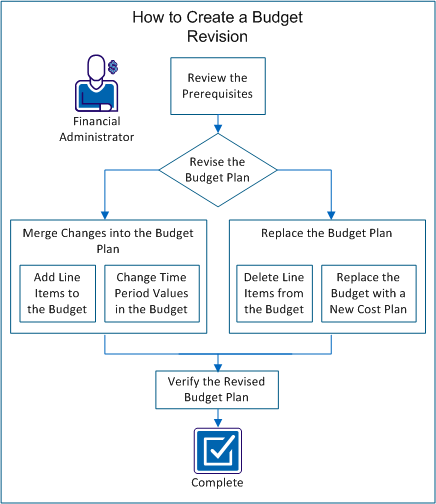
The following diagram describes how a financial administrator creates a budget revision.
Example: Revise a Forward, Inc. Budget Plan
The following example illustrates the options for updating the budget plan throughout this scenario. Forward Inc. has a new project that is planned for later this year. Alice manages the project and has already created a cost plan (ProjectA_estimatedCP-00) with the required roles and estimated costs.
She needs the following roles:
Alice has not yet staffed the project. In her submitted cost plan, she added roles for each of the positions and populated the cost plan for the six months of the project.
When creating the cost plan, Alice used the following properties for her cost plan:
She submitted the estimates for approval as the current budget plan. Alice's product manager approved the estimated budget. The manager knows that the budget will change before the project begins.
Perform these steps to create a budget revision:
| Copyright © 2012 CA. All rights reserved. | Tell Technical Publications how we can improve this information |
